
Welcome to our second article from Giles Male and Fay Bordbar, Excel experts and founders of ‘Excel on the Road’. In this article, Fay and Giles take us along on their trip around the UK and introduce us to some tips learnt from the world of Excel Esports.
Part 1: Fay
Welcome back as we take you along on our trip through Manchester, Leeds, Edinburgh, and Liverpool. After that, we’ll be in London in time for Accountex and the Global Excel Summit in May, where I’m co-hosting and Giles is speaking alongside his Unpivot podcast cohosts. I highly recommend this event as it’s very educational for Excel and Power BI users and ICAEW Excel Community members get a discount on tickets with code “ICAEW15”!
Come say hi if you spot us there!
Students’ Excel skills
Back to our UK trip. This week we spent a morning at the University of Manchester with a group of students, talking about Excel and the fact that it’s one of the core digital skills they will lean on when they leave university and enter the corporate world.
What surprised me most was how little the students we met had used Excel. Around 90% of the students said they’d “almost never” used it… and these were students on a quantitative methods course! The plot twist? They are learning the coding language R as part of the course.
It took me straight back to my own student days learning R and Maple while studying Mathematics at the University of Sheffield. While I’m genuinely glad they’re getting hands-on coding skills and building wider data literacy knowledge, it did make me wonder how we’ve ended up in a world where students can write code for statistical analysis yet aren’t routinely taught the spreadsheet skills they’ll almost certainly be expected to use in their first job.
So, I started asking around: is it common that spreadsheet skills are not being picked up at university and, if so, where do people learn Excel properly? Is it self-taught, picked up from colleagues, or just from YouTube? And if that’s the reality, should we be doing more (as educators, employers, and professional bodies) to bridge the gap with practical, work-ready skills in Excel?
It’s brilliant to see how much Excel training content ICAEW provides, but it also made me curious: why are overseas universities focusing more on Excel in their courses than equivalent courses here in the UK?
Back to our Manchester University session. Once we’d assessed the room, we walked through a few of our most useful Excel Esports functions (like LEN, TEXTSPLIT, LARGE, SUBSTITUTE) and then let them loose on a battle case for the first time.
This was the best part of the session: watching the room change once we moved from “talking about Excel” to getting stuck in. We gave them 25 minutes and told them they could ask for help if they needed it. Within minutes, people were swapping hints across the room, switching to personal laptops to get modern Excel functions, and asking smart questions about why one approach was faster or better than another.
Excel versions matter
If you’ve ever delivered (or sat through) Excel training, you’ll already be thinking: hang on… what version of Excel were they using on the lab computers?
We soon found out. Excel 2021.
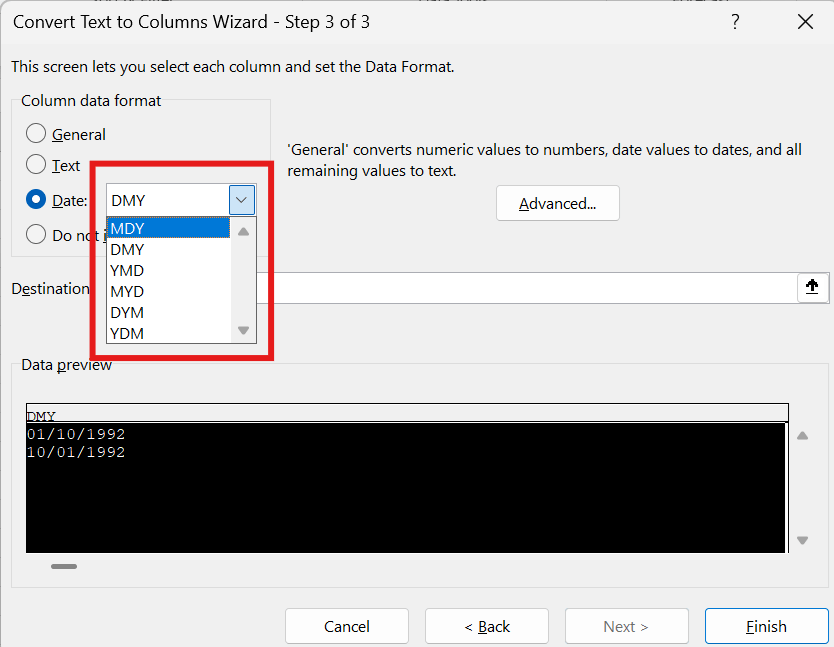
Which meant that many of the students didn’t have TEXTSPLIT - a function we absolutely take for granted now (it rolled out in 2022 for Microsoft 365 subscription users). So, we dusted off the trusty “Text to Columns” to split a string of numbers that were separated by a hyphen delimiter. Who still uses Text to Columns these days? Modern Excel has made it feel outdated, but I’ll admit I still love how quickly you can use the “Column data format” settings to flip dates between UK and US formats:
Anyway, it was a great reminder of what Modern Excel brings to the table. The feedback was positive and the lecturer even said “getting 100% participation during a tutorial was a first”, so we were chuffed.
More importantly, it reminded me that Excel resonates with people (and brings them together) when it’s hands-on, slightly competitive, and tied to something fun… which is a perfect introduction into Giles’s segment this month.
Part 2: Giles
This month I want to bring you one step closer to the world of Excel Esports.
Fay and I are part of the team that runs the Excel UK Championship, which is something we’re both extremely passionate about. Tackling an Excel Esports battle case is one of the most valuable, high-intensity, and, dare I say it, “fun” experiences you can have with a spreadsheet.
A typical battle scenario
On the day, you’re given a live case or ‘battle’ , and you have 30 minutes to solve as many questions (levels and bonuses) and earn as many points as you can (1,250 points are usually available for solving 7 levels plus 5 bonus questions).
The questions tend to be pretty easy at levels 1 and 2 but then step into difficult territory beyond that. Usually only the most experienced Excel Esports players can complete a full case within the 30-minute timeframe.
Here’s an example of a level 1 question from a brilliant case by Peter Scharl, called Laundry Time. This case is about items of clothing that are put into the laundry.
We’re given this table of information at the top of the battle spreadsheet:
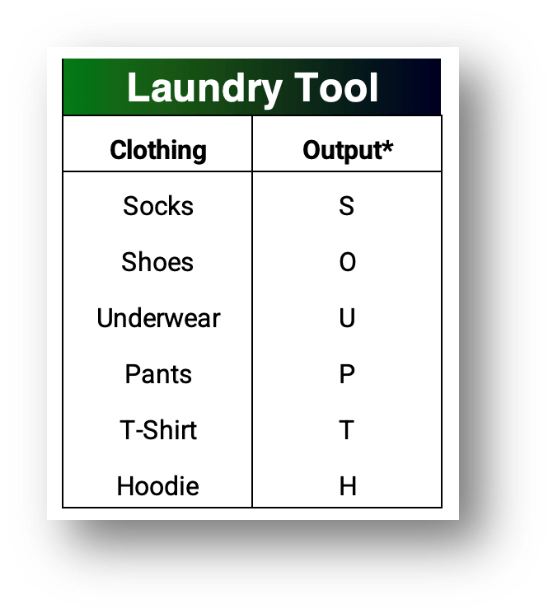
Note: The “Output” column is essentially a single character code for each item of clothing.
And then Level 1 reads like this:
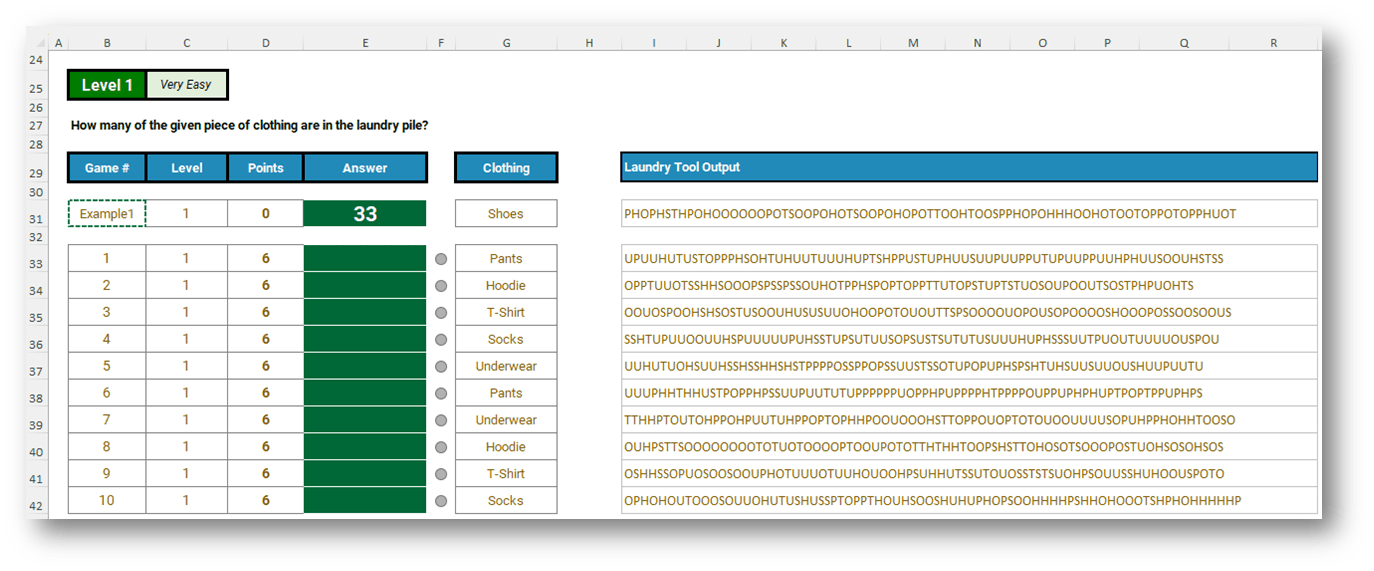
We have to put our answers in those green fill cells, for each game (1-10) of Level 1. If we enter the right answers, we earn 6 points per game (so 60 points are on offer for this first level).
In game 1 (row 33) we’re looking for the number of times Pants (code “P”) turns up in that long string of clothing item codes (under the heading “Laundry Tool Output” in cell I33).
How would you solve this with Excel functions? Take five minutes to think through your approach, just in your head for now.
One “old school” way of doing this would be to lean on LEN and SUBSTITUTE:
=LEN(I33) - LEN(SUBSTITUTE(I33, XLOOKUP(G33, Clothing,ClothingCodes), ""))
Where I33 is the cell reference for the long text string of item codes, and G33 is the clothing item we’re trying to count.
In the formula above, also note that I’ve given my clothing range from the first screenshot a Named Range called “Clothing”, and the associated clothing codes a Named Range called “ClothingCodes”.
This formula works because we’re counting the number of characters in the full text string within the first LEN, then counting the number of characters in the same text string after replacing every instance of the character we’re searching for with “” (so in example 1, we are replacing every instance of the letter P with nothing). Subtract the latter from the former and you’re left with just the count of the characters you removed.
But Excel offers so many ways to solve a problem these days!
=COUNTA(REGEXEXTRACT(I33, XLOOKUP(G33,Clothing, ClothingCodes),1))
What you see in the formula above is REGEXEXTRACT, one of the more recent additions to the Excel functions library, doing the job for us with fewer characters and keystrokes. The Excel Community explored regex and Excel functions like this one in its webinar which you can watch on demand here.
In both solution formulas we’ve used XLOOKUP to return the item code first, and then you’re just seeing two (of many) potential routes you could take to count the occurrences of the chosen clothing code in each game.
Can you think of other, or potentially better solutions? If so, reach out to us at excel@icaew.com or through our community’s LinkedIn group.
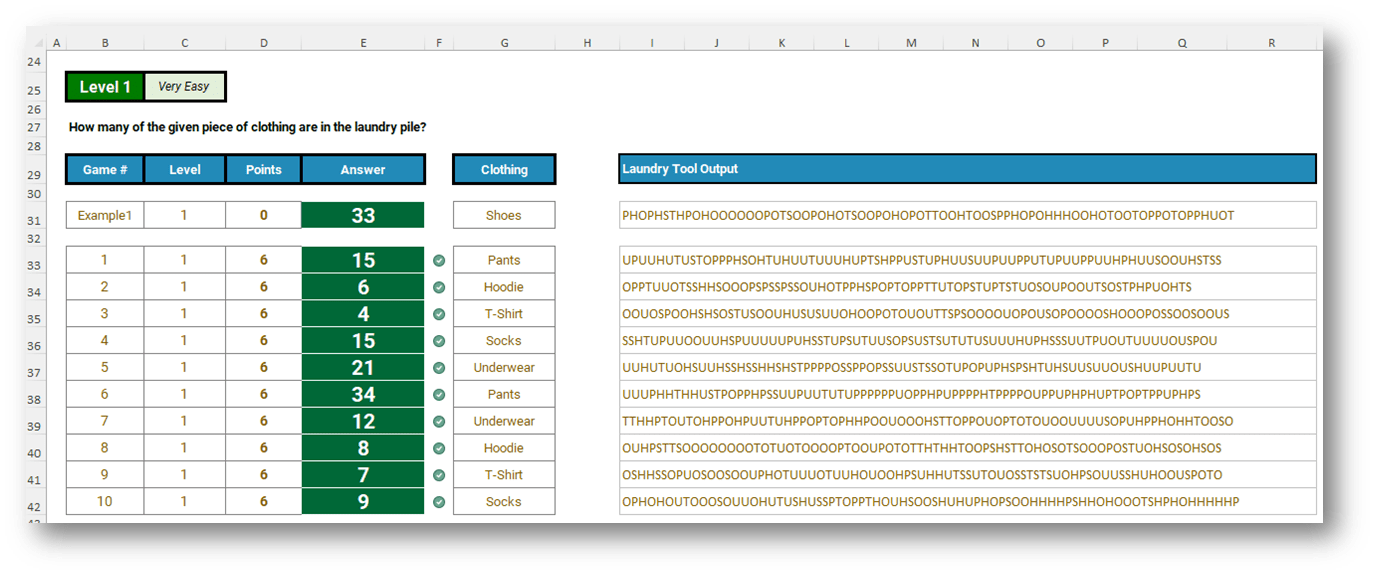
Here are the answers, for those interested:
And if you’d like to give this a go yourself, follow this link to download the workbook with level 1 ready and waiting for you (thank you Peter for giving me permission to share this!).
I appreciate you are unlikely to face the challenge of managing your laundry items within your Excel models any time soon. But who knows, maybe this sort of data manipulation skill will come in handy one day in your analysis at work.
Archive and Knowledge Base
This archive of Excel Community content from the ION platform will allow you to read the content of the articles but the functionality on the pages is limited. The ION search box, tags and navigation buttons on the archived pages will not work. Pages will load more slowly than a live website. You may be able to follow links to other articles but if this does not work, please return to the archive search. You can also search our Knowledge Base for access to all articles, new and archived, organised by topic.
- Cells, Chaos, and Collaboration: Excel on The Road in Amsterdam
- Global Excel Summit 2026: The sum of what you missed, sorted by where to begin
- Excel on the Road is… back on the road!
- From codebreaking to spreadsheets: what Bletchley Park can teach today’s Excel users
- Edinburgh Fringe: Excel comedy laced with tips, and flat earth believers