Along with Karen Ko, I recently delivered a webinar for the ICAEW Data Analytics community – Analytics in the world of agentic AI – where we evaluated the use of agents in automating financial processes. Karen showed a completed expense tracker application. I showed a (somewhat rudimentary) attempt at trying to build a direct cashflow model in Excel. (Initially just using ChatGPT and then progressing to agent mode in Excel, I provided additional context with text files outlining best practices and techniques I wanted it to follow. This second approach delivered much better outcomes but was a far cry from something that can be outsourced to AI.)
The purpose of the session was to highlight the huge potential of agents. By combining the reasoning power of an LLM (the “brains”) with the ability to actually work directly inside of tools such as Excel to build solutions (the “hands”), it is indeed now entirely possible to streamline finance processes through automated workflows developed using Generative AI.
But recognising the capabilities of AI isn’t the challenge. Rather it’s knowing how to leverage it in the right way as a finance professional whose technical skillsets are still very much grounded in the way things have always been done in Excel. All whilst making sure the finance processes are repeatable, auditable, and flexible enough to deal with all of the nuances of stakeholder expectations, accounting rules, and regulatory requirements. This requires not just upskilling (or re-skilling) in a bunch of technologies and tools, but actually a fundamental mindset shift to transform how finance processes are carried out.
Traditional automation still has huge value in accounting processes because many aspects of these processes are repeatable steps that need to be done in the same way each time ie, run in a deterministic fashion rather than a probabilistic one. (LLMs work in an inherently probabilistic manner!)
However, applying traditional automation (like VBA macros in Excel for example) results in rigidity and ultimately technical debt as a large number of automation solutions need to be built for each nuance/difference in data that can be encountered.
The key advantage of Gen AI is that, unlike traditional automation which follows fixed rules, agents can understand goals, adapt to new information and ask for human input to validate outputs and modify the process as required. But whilst agents have reasoning capabilities, it needs to be taught to do this. By default, Gen AI is like an intelligent intern who is over-confident and prioritises speed over doing things in the right way. It doesn’t need to be taught all the generic accounting rules (it knows a lot of this from its general knowledge base of the internet) but rather it needs to be taught how to apply them to your process, what your data means, and how to apply the critical thinking capabilities for meeting specific requirements (including governance and technology constraints) like an accountant has to in real life.
In this article I will outline a five-step framework to follow when trying to build an agent for automating a finance process, based on using the Microsoft toolsets such as Excel, Power BI, Fabric and Copilot Studio.
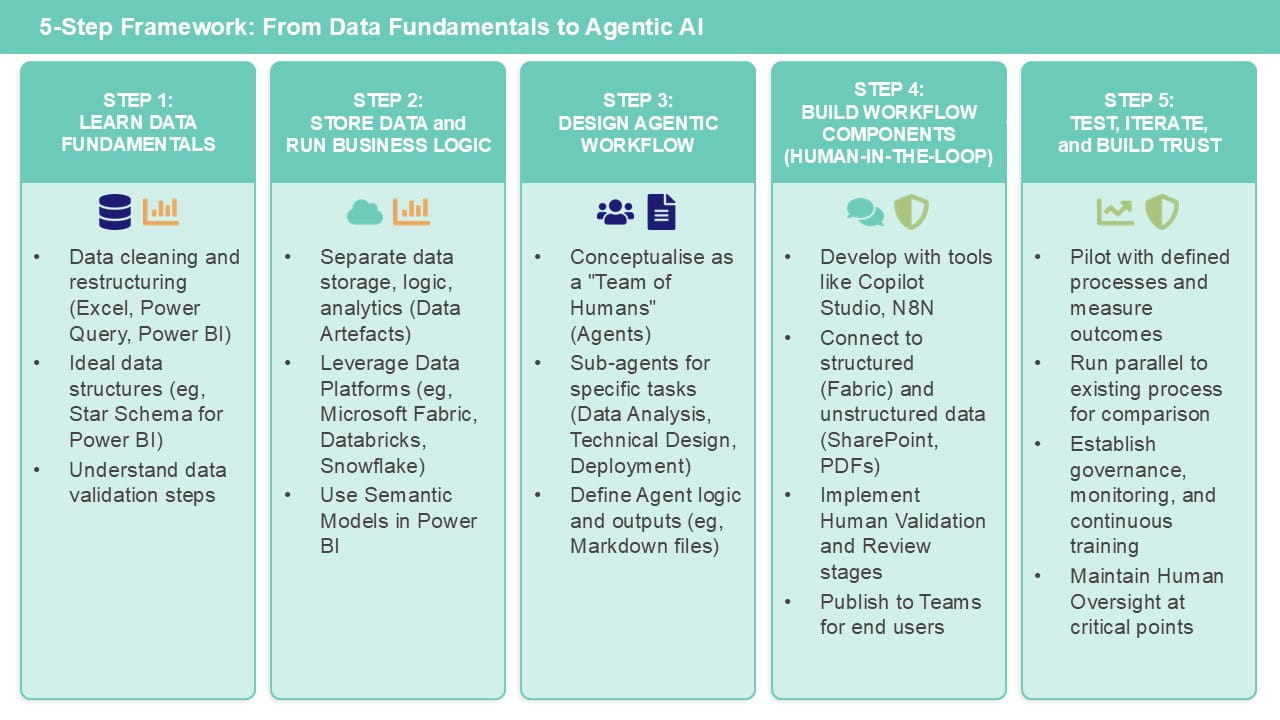
Step 1: Learn the fundamentals of how to work with data tools (including Excel)
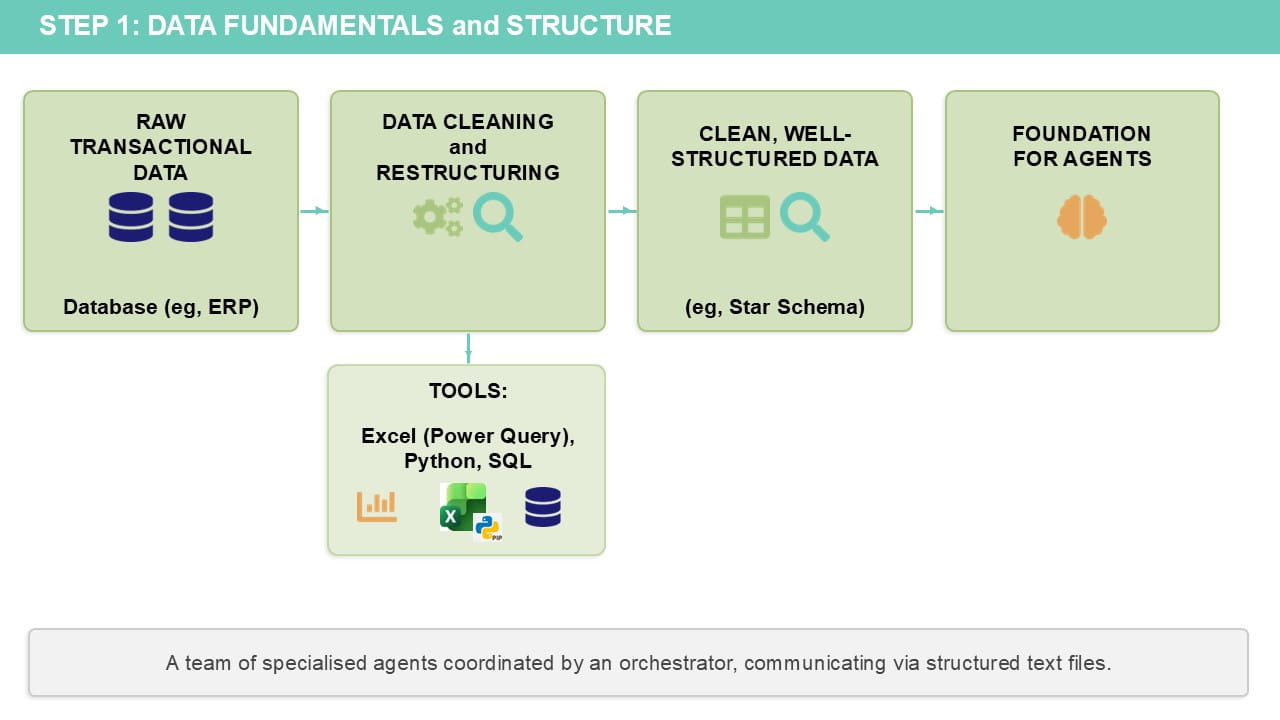
This is the kickstart you need to get you ready for Gen AI based automation. Having clean, well-structured data is the foundation of the context that agents need in order to automate a process.
It includes a fundamental understanding of how to clean and restructure data, using any tools of your choice. On the Microsoft side, this could be Power Query (Get Data in Excel), SQL, Python (also in Excel), or Power BI. If you have no experience of any of these, my recommendation would be:
- Start with learning some of the ways to work with data effectively in Excel (see this article on why this is great for your career!).
- Move onto Power Query in Excel.
- Then move to Power BI (either as a standalone tool or part of the wider Fabric ecosystem).
Regardless of the tool, the key here is to be able to understand the following:
-
Understand what clean data looks like for the datasets that you work with.
You also need to know what kind of steps need to be carried out to both check/validate the initial data and the steps to perform the data cleaning activities.
Even if you don’t know how to write code/formulas to implement all of these steps, you should be able to describe them in natural language that can be passed into Gen AI.
-
Understand what the ideal data structures are for the intended purpose(s).
It is quite unlikely that data which comes out from a transactional system (eg, financial records coming from an ERP) will already be in a format suitable for analytics or the processes that you need to run. For use in a tool such as Power BI, your data should be structured in what is known as a star schema.
Even if you are trying to automate a process that is done entirely in Excel today, document the data structure (the fields in each table) in each of the calculation and output worksheets. These are the “target” data structures that your agent will need to end up with.
-
Gain a foundational knowledge of the key tools that you will be using.
This could be Power BI or Microsoft Fabric (this ICAEW webinar provides an introduction to Fabric). As far as possible, you should learn what the components of these tools are and how they are to be used, as well as getting the ability to be able to read/understand any code that they generate.
Of course, this is something AI can help with massively now. Even just any standard LLM tool without the context that we are building here should be able to generate and explain code in any language. But you need to be able to understand what it has written to some degree in order to be able to validate it. This could include SQL, Python, DAX or Power Query (M) code, for example.
It’s important to highlight that you don’t need to become an expert in all of these in order to build agents that will use them; you just need to know enough to be dangerous (in a good way!).
Step 2: Consider where to store your data and run business process logic
The fact that there are so many choices of tools/technologies for working with data is a double-edged sword. On one hand, the choice gives you the flexibility of being able to pick a technology according to the skillsets in the (human!) team that will be building and running this workflow, as well as by technology industry best practices and any corporate governance/security requirements your organisation might have. In reality, however, you might be restricted by what your company has already purchased licences for and what is accessible to you as a finance team.
If you are fortunate enough to work in an organisation that has individuals with data/IT skills, it would be well worth a conversation with them. And of course you can ask the question, to your LLM tool of choice (Copilot, ChatGPT or Claude, for example). The key to getting back a sensible answer is to provide it as much context to your organisational needs/requirements and skillsets as possible – all of those standards and policy documents relating to handling data/technology architectures can finally be put to use without you having to read and understand them all!
I’m obviously biased but, of all the technology vendors, I think Microsoft are the most focused on making sure their toolsets are accessible to non-developers. This is true of Power BI – they have tried to make DAX syntactically similar to Excel and have ensured that you can do almost all the data cleaning/restructuring activities that you would need to in Power Query without writing a single line of code. However, Power BI isn’t a database – whilst a semantic model in Power BI stores data and contains business logic, it isn’t always suitable as a sole data artefact for everything.
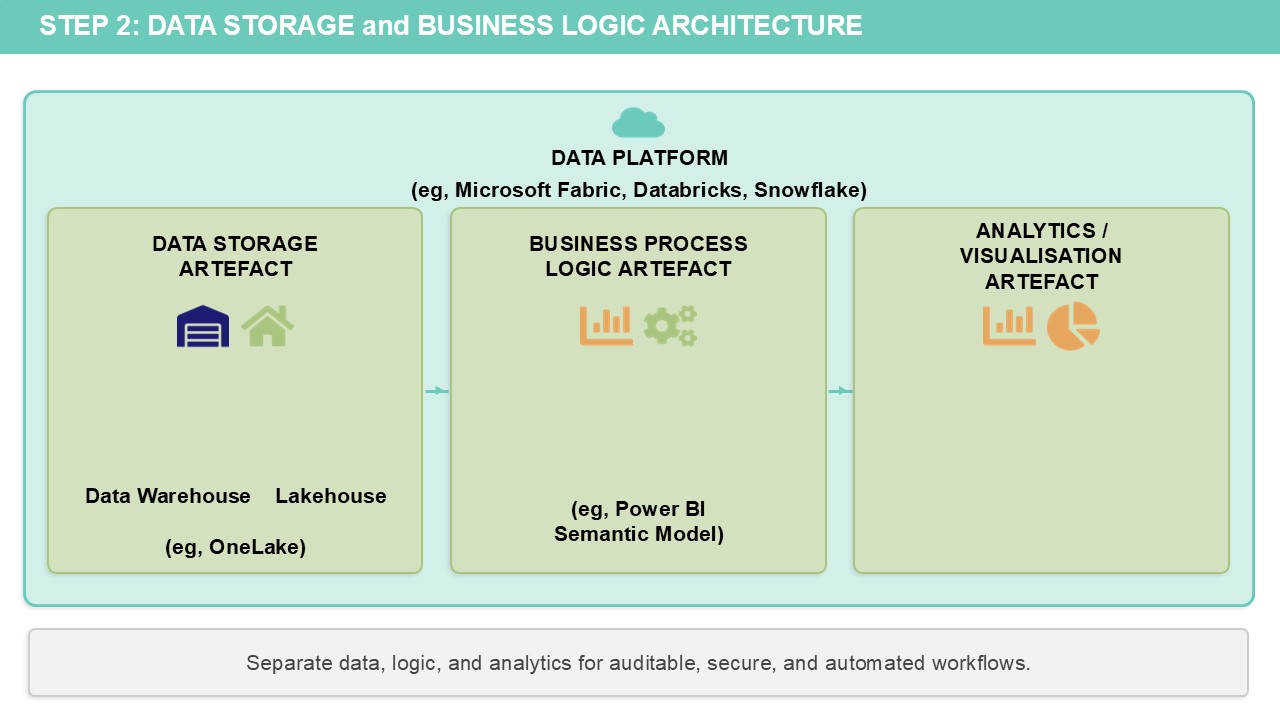
Instead, good data governance practices involve separating out the various components of data storage, business process logic and analytics/visualisation into separate data artefacts which can be independently managed and secured.
This is where the idea of a data platform comes from – somewhere to build, host and manage the variety of data artefacts needed for a complete data product that ensures your data and logic is auditable, secure and automated.
Historically, data platforms have been the sole purview of specialised data engineers who build data warehouses for the rest of the business to consume. With Fabric (which Power BI is now just one component of), the idea is that all the other data artefacts for storage and business logic – can largely be built and managed without using code.
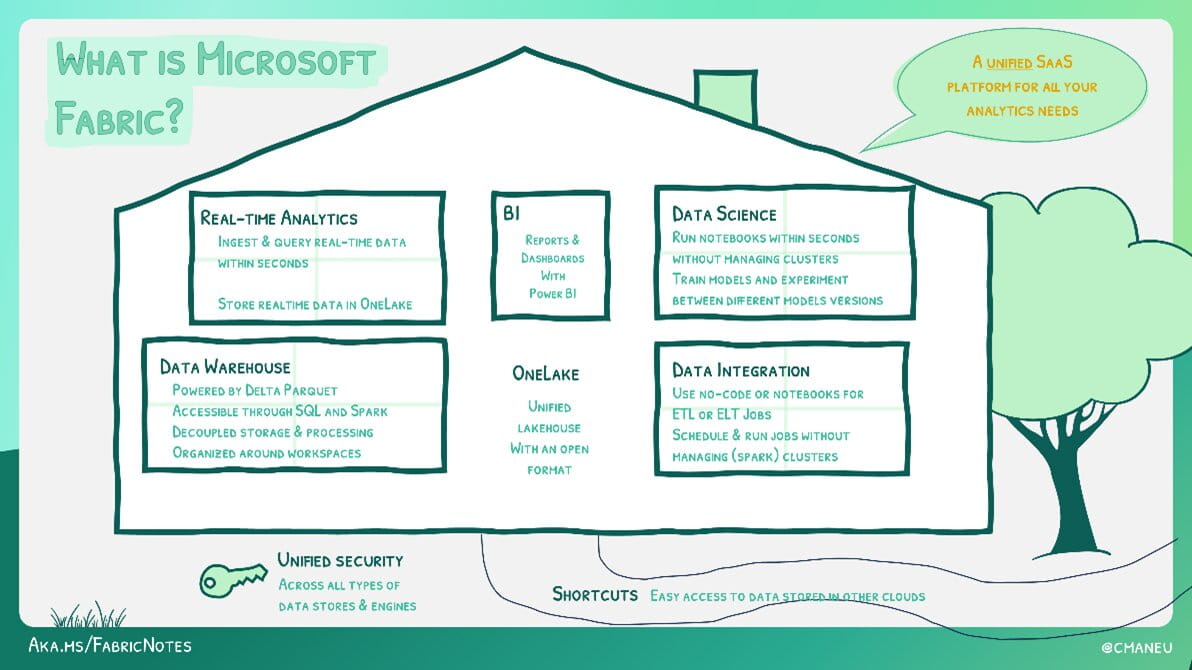
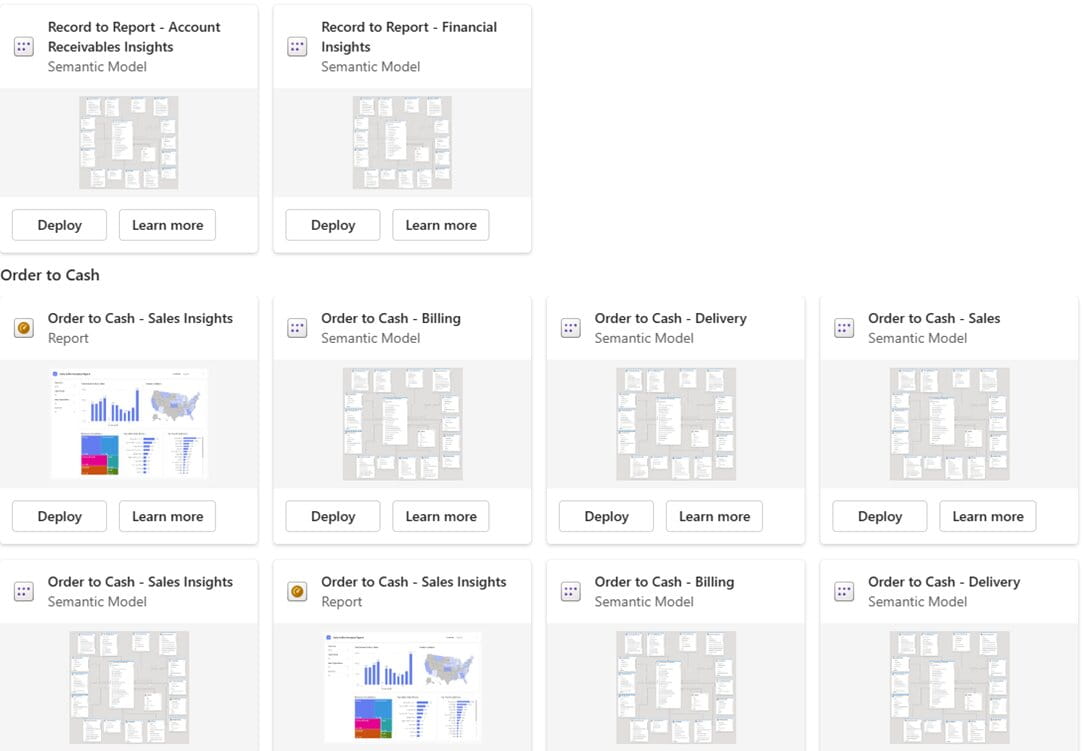
For reference, Fabric Pay-as-you-go pricing starts at $262/month (or less if paused when not in use), which includes Power BI Copilot capabilities. For teams such as Finance, Microsoft has developed Business Process Solutions. These are pre-built connectors that can integrate with enterprise systems like SAP (with Salesforce, Oracle and Dynamics planned) to provide a ready-made Fabric architecture, including semantic models and Power BI reports for common finance scenarios such as Financial Analysis, Order to Cash and Procure to Pay.
Other data platforms include Databricks, Snowflake and SQL Datawarehouse (on-premises or in the cloud). If you already have these in place, these are all also suitable for Gen AI agents.
It isn’t essential to have a data platform in order to run agentic process automation workflows. You could just connect to local files (or store them in SharePoint/OneDrive) and use Excel/Power BI for all your business logic. But the rigour of a data platform is going to provide a more robust data foundation for your agents.
About the author
Rishi Sapra is a Microsoft MVP and Data and Strategic Project lead at Avanade. Here are some of his previous articles and webinars:
