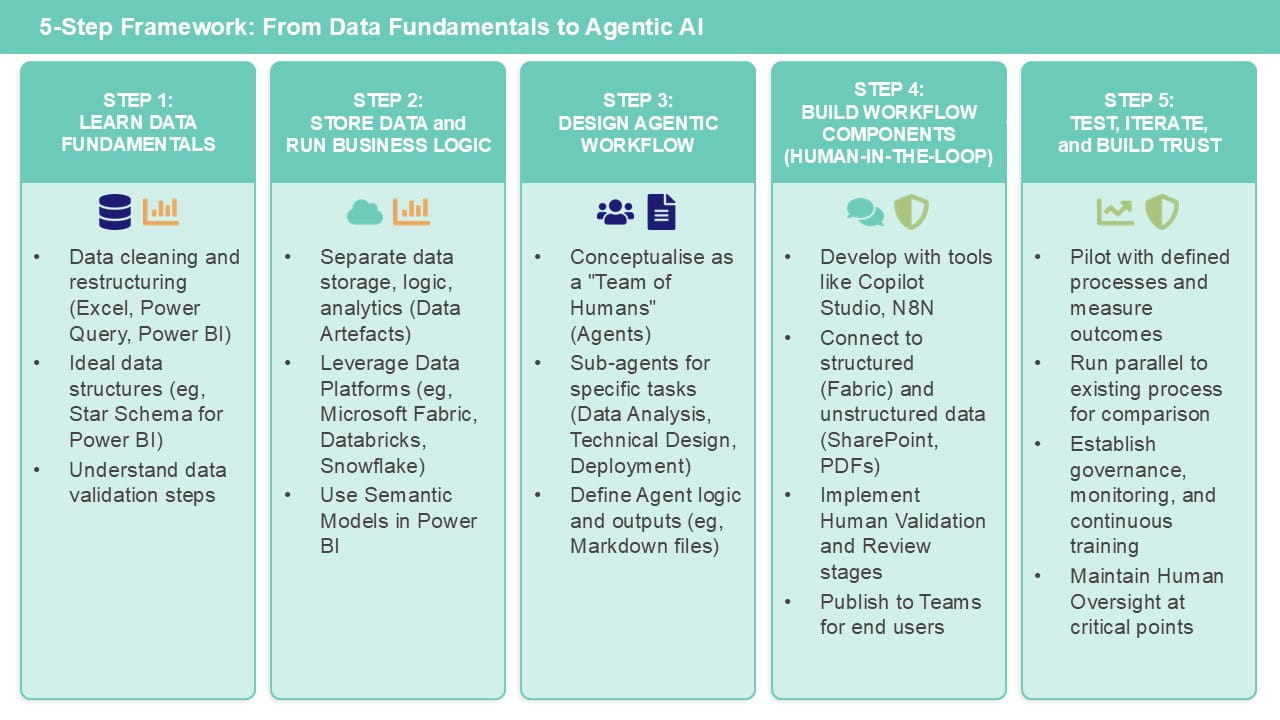
In this second article, I will continue to outline a five-step framework to follow when trying to build an agent for automating a finance process, based on using the Microsoft toolsets such as Excel, Power BI, Fabric and Copilot Studio.
Step 3: Design an agentic workflow
The easiest way to understand how to build an agentic workflow is to think about it as a team of humans. Just asking a question about your data/process to a standard LLM tool, without providing it any context, is like stopping to ask a stranger in the street (albeit a very intelligent one with all of the knowledge of the internet). You’ll get back an answer that is broadly sensible, but by nature it will be generic and may “hallucinate” when it has to use an element of imagination or make assumptions about what you’re asking.
Contrast that with asking a team of data and finance experts. Each of them are skilled in their specific domain/tasks. They have been trained in using specific tools for data cleaning/modelling, applying judgement grounded in finance/accounting rules where appropriate, and visualising/interpreting results. Of course, that tool can be Excel, and you may find that the easiest place to start. But even if your end outputs are in Excel (for you to validate), it is likely that you will want to leverage other technologies for everything in-between.
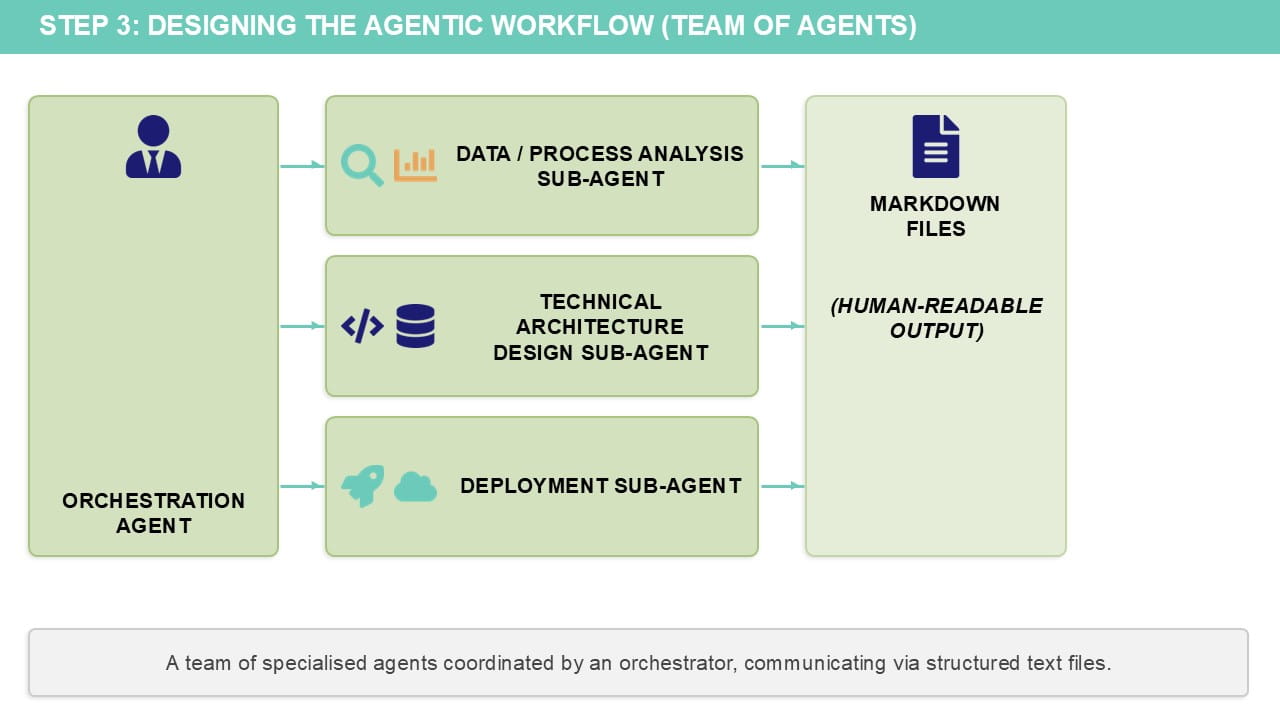
Each human in the team is represented by an agent (or more accurately sub-agent; there will be an overall orchestration agent that knows when to call upon each team member/sub-agent based on the workflow and process).
Tools such as Claude code can design the agentic workflow for you with a prompt (this video provides an example of how to do this).
The output of each sub-agent is one or more markdown files – human readable text files that are just formatted with specific headings. This is a format that Gen AI tools know how to read and work with.
Typically, the types of sub-agents you might want to include are:
-
A data/process analysis agent
This will take your existing process (eg, in Excel) and – combined with documentation/guidance you provide it – will be able to understand what the source/output data structures are and the logic that is being applied at each stage.
Anthropic have recently released Agent skills, and one of those skills is being able to work with Excel files. This could be used to come up with a first draft of representing your finance process in markdown format, though it is likely you will need to edit this document (which you can do in Word or Notepad!) with additional details. You will also need to provide instructions on how to adapt any logic based on certain criteria, if you want the agent to apply judgement/reasoning capabilities.
-
A technical architecture design agent
This can translate the business process logic – described in natural language in the markdown file produced by the previous agent – into (deterministic) code, using whichever tools/languages you are working with.
The output of this agent could be SQL code, Power Query code (written in a language known as M) or Python for example. It could of course be Excel formulas (the Excel Agent skill can also create workbooks!) but this is unlikely to represent the right kind of process transformation that warrants building an agentic workflow.
-
An (optional) deployment agent
This should be able to create the data artefacts that are required eg, a database complete with all the required tables, or a set of lakehouses in Microsoft Fabric to represent the data at each stage.
If you are using MS Fabric, for example, the agent will also be able to create either notebooks – written in SQL or Python, for example – or Power Query definition which can be executed as a Dataflow (this will be the most familiar if you are used to working with Power query in Excel!), as well as semantic model code for table relationship-based business logic.
Step 4: Build the workflow components (with a human in the loop!)
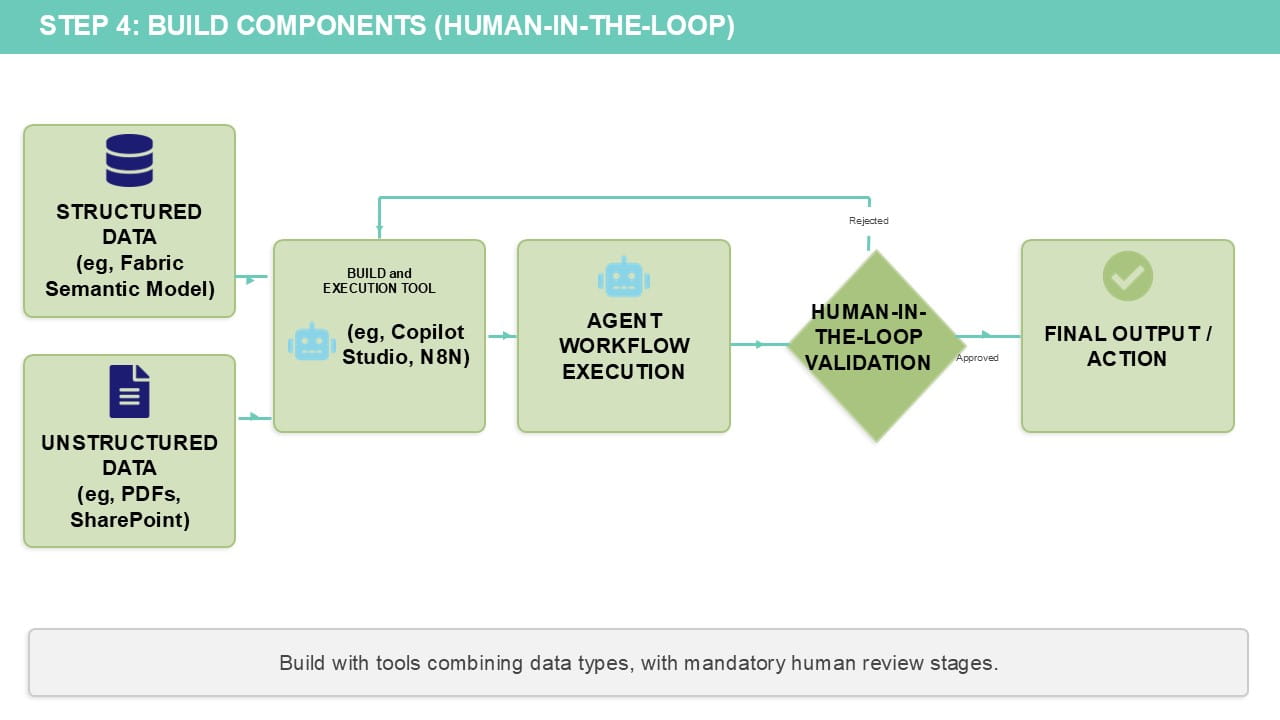
The agents that we have designed above – all just as a series of markdown (text) files – now need to be run in a workflow. A human needs to be validating at appropriate stages during the build and/or reviewing the outputs at the end.
There are multiple tools which we can use to build an agentic workflow. We’ll cover two here: Copilot Studio and N8N.
Workflows can be developed using Power Automate flows, which are built into Copilot Studio. These workflows can be connected seamlessly in the Microsoft ecosystem and can be triggered, for example, by an email arriving in an inbox or a file being uploaded to SharePoint. It can also pause the workflow for review/approval by a human, or can run entirely autonomously if desired.
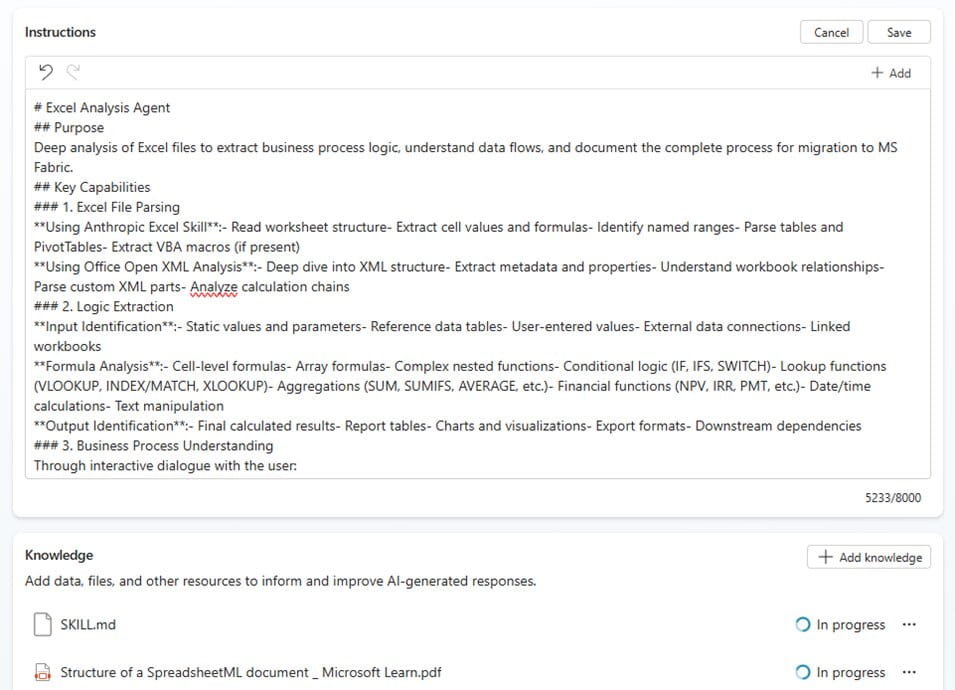
The markdown files generated above can be added as agent instructions for each sub-agent, shown here for a “Excel analysis agent” which also has the Claude skills markdown file (and PDFs on how to read Excel files) added as knowledge:
The real power comes from combining structured analytics (eg, from Fabric) with access to unstructured data (eg, PDFs or PowerPoint slides that can be stored on SharePoint/OneDrive).
For example, a data agent can be built in Fabric connected to a semantic model – containing your key corporate performance metric logic – which can then be published and included as a sub-agent in Copilot Studio. If this agent is also then connected to unstructured data (eg, invoices or industry/market reports), the agent can provide not just insights from your semantic model but also the underlying reasons for that performance from granular and less structured data sources.
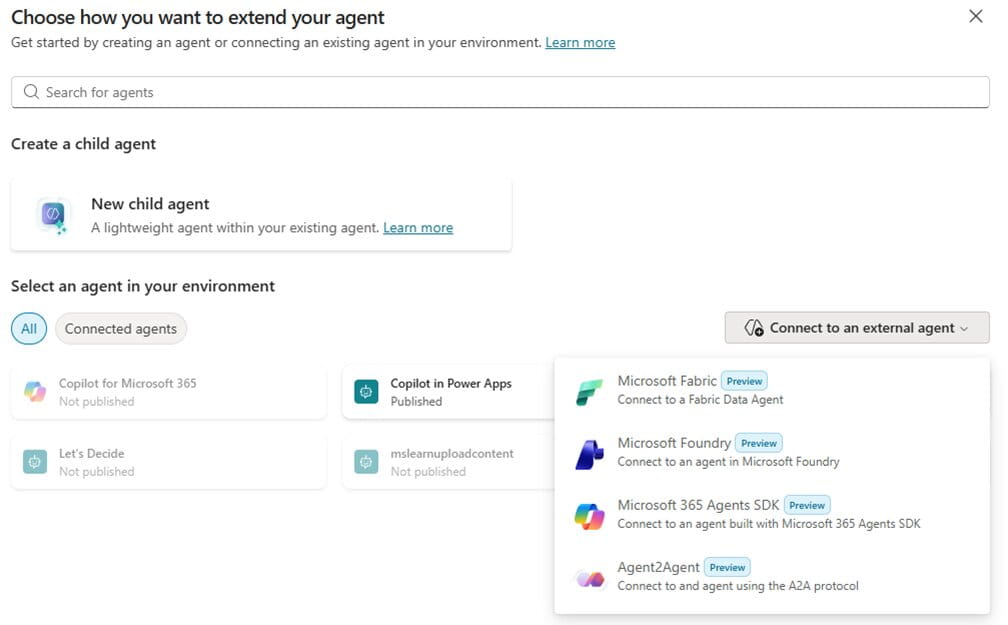
Each sub-agent can be added as a child agent into the overall Copilot agent (which has instructions on the overall process/workflow ie, when to call on each sub-agent).
The overall Copilot agent can then be published to Teams, so end users can talk to it in a Teams chat in the same way as they would ask a question to a member of the finance team. And this agent is grounded in your corporate data/logic, so should have minimal chance of hallucination!
Work IQ provides secure agent grounding that respects existing Microsoft 365 permissions, sensitivity labels, and compliance controls, so the integration story for Copilot Studio is compelling.
N8N takes a different approach as an open-source, code-flexible platform. It supports four key agentic patterns: chained requests, single agent with state management, multi-agent with gatekeeper delegation, and multi-agent teams for distributed decision-making. The platform connects to LLMs, vector stores, MCP servers, and 400+ integrations, with the ability to add custom code in Python or JavaScript when needed.
The strength here is architectural flexibility. You can build sophisticated multi-agent systems with explicit loops, parallel execution, shared RAG, and dynamic agent calling. However, there are practical limitations: N8N's conversational agents lose context when workflows end, requiring external databases for persistent memory. For complex workflows requiring long-term context or autonomous planning, you'll need to build additional infrastructure.
Step 5: Test, iterate and build trust in the solution
Building trust in agentic solutions requires a deliberate approach to validation and stakeholder engagement.
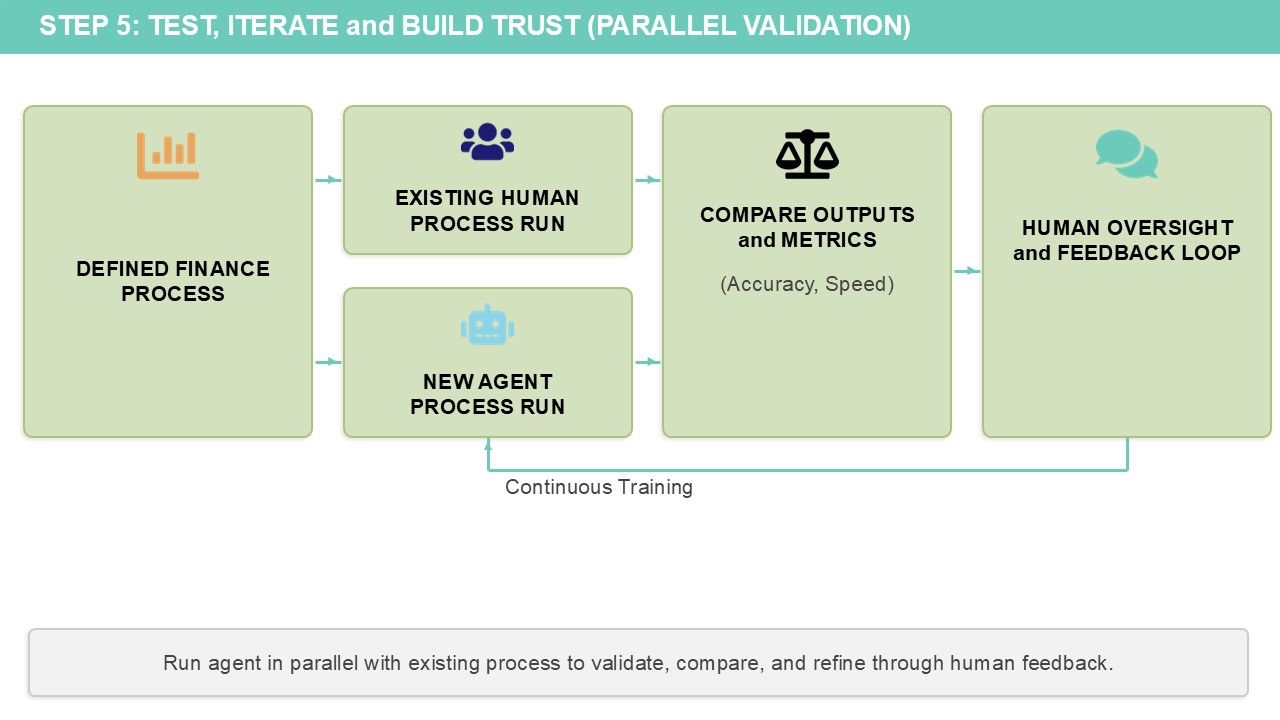
Start by piloting your agent with a single, well-defined finance process where you can measure clear outcomes – hours saved on reconciliations, error reduction in reporting, or faster close cycles. Run the agent alongside your existing process initially, comparing outputs and documenting where it succeeds and where human intervention is still required. This parallel approach builds confidence in the agent's capabilities while identifying edge cases that need refinement. Share these results with your finance team using both quantitative metrics (processing time, accuracy rates) and qualitative feedback from the users testing it. Success stories grounded in real data create momentum for broader adoption.
The key to sustainable adoption is treating your agent as a team member that needs continuous training and feedback, not a one-time deployment.
Establish clear governance around who can modify the agent's instructions, how changes are tested, and how performance is monitored over time. Use the built-in evaluation features in Copilot Studio to systematically test your agent against known scenarios before each update. Most importantly, maintain human oversight at critical decision points – agents should augment financial judgment, not replace it.
As your finance team gains confidence in the agent's outputs and learns to work effectively with it, you can gradually expand its responsibilities while documenting the business value delivered.
This measured approach transforms scepticism into advocacy and establishes the foundation for scaling agents across other finance processes.
See the Copilot success kit from Microsoft for further guidance on driving the right kind of adoption of these tools. Be careful not to underestimate the people aspect when rolling out technology solutions, especially those that may be perceived as potentially replacing human roles!
It should be clear that this isn’t a quick fix. Gen AI isn’t a silver bullet, and the time and effort for doing this will need to be weighed up against purchasing a pre-built AI tool/leveraging AI functionality in existing systems to do it instead. There may be cases where this latter approach is more appropriate and cost effective, but I think the self-build approach establishes self-sufficiency and skillsets that are a solid foundation for making your organisation data and AI driven in the long term.
About the author
Rishi Sapra is a Microsoft MVP and Data and Strategic Project lead at Avanade. Here are some of his previous articles and webinars:
