
The rapid emergence of large language models (LLMs) has already reshaped how many of us write, research and reason. The next frontier is more interesting for accountants and analysts - embedding those capabilities directly inside the tools we use every day. In this article, Craig Stirk, founder of Sarcul Consulting and Chief Innovation Officer at Sprift Technologies, explores using Claude’s add-in for Excel.
A relevant recent example is the Claude add-in for Excel, which integrates the LLM into the creation, analysis and editing of workbooks.
This article sets out some early observations from hands-on experimentation with the Claude Excel add-in. It is not a product review or a recommendation. Rather, it is an exploration of what the tool can already do well, where caution is needed, and how professional disciplines such as the ICAEW spreadsheet principles materially improve outcomes.
Access and practical setup
At the time of writing, access to Claude for Excel requires a paid plan – either a business tier (Teams or Enterprise) or the Max plan. This positions it as a professional tool rather than a casual experiment.
Once enabled, the add-in allows prompts to be issued from within Excel and responses to be written directly into worksheets. This creates a very different interaction pattern from copy-and-paste workflows between Excel and a browser-based chatbot.
Workbook creation – strengths and limitations
If you ask Claude to “create a financial model”, you will usually receive a simple income statement. This is not a flaw so much as a reminder that LLMs respond very literally to what is asked. Prompting explicitly for a three-statement integrated model (income statement, balance sheet and cash flow) produces a far more useful starting point.
A particularly effective pattern is to do the thinking elsewhere first. For example:
- Use an LLM in conversational mode to explore a new business, market or operating model.
- Ask it to summarise that discussion into a structured prompt suitable for building an Excel workbook.
- Paste that refined prompt into Claude for Excel.
This approach is good analytical practice - clarify the problem before opening the spreadsheet.
Claude is good at:
- Creating logical worksheet structures.
- Producing proof-of-concept models.
- Identifying and incorporating publicly accessible datasets.
In one example, I asked for data relating to parliamentary constituencies to underpin some scenario analysis. While Claude could not download the data directly, it provided clear, step-by-step instructions on how to obtain and integrate it manually, while creating the relevant input cells in the workbook so I could simply copy and paste the downloaded data.
Caution is required in error handling. In more complex workbooks, circular references occasionally appeared. When asked to fix them, Claude sometimes failed to do so and, in a few cases, hallucinated explanations. Including explicit instructions in your prompt such as “include good-practice error checks to confirm the balance sheet balances” improves the result, but it does not eliminate the need for human review.
Screenshot below shows one “improvement” which I am still attempting to understand:

Figure 1 – An interesting “fix” to a circular reference
The importance of spreadsheet principles
One clear lesson from this experimentation is that ICAEW’s principles for good spreadsheet practice make a significant difference to the quality of the output.
Prompts that explicitly reference these including:
- Separation of inputs, calculations and outputs
- Consistent formatting conventions
- Clear documentation
- Built-in checks and controls
produce models that are not only more usable, but easier to review and trust.
LLMs do not replace professional discipline - they amplify it, with poor practice scaled just as effectively as good practice.
Documentation
One very useful capability is documentation.
Many spreadsheet users acknowledge the importance of documenting models, but fewer enjoy doing it. Claude does. Prompting it to “generate a README worksheet explaining the structure, assumptions and limitations of this workbook” produces a clear and readable starting point.
For internal models, this alone may justify experimentation with the add-in, particularly where workbooks are shared across teams or revisited months later.
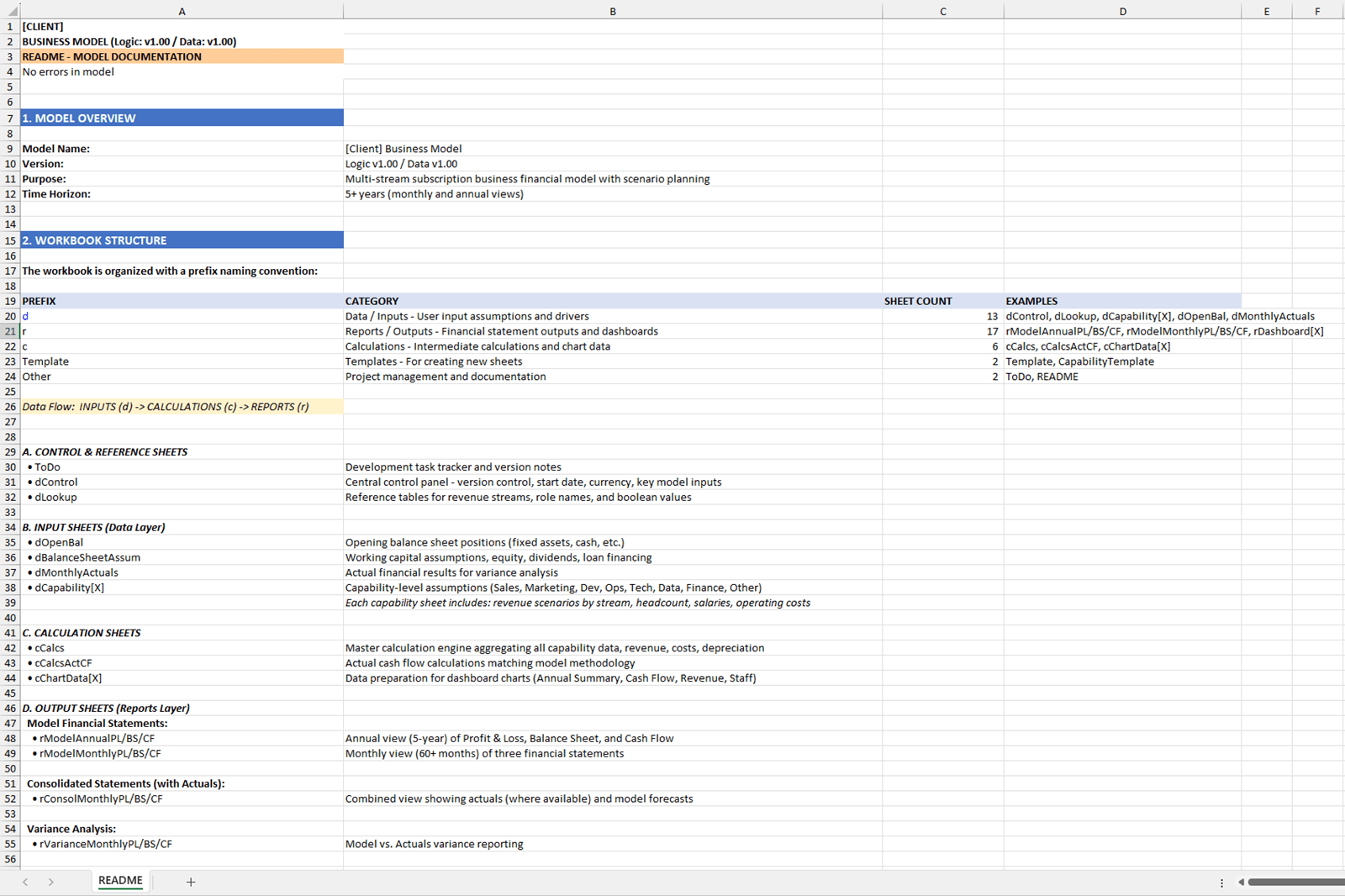
Figure 2 – Automatically generated README worksheet
Claude was also very useful in providing comprehensive explanations of individual outputs. The prompt “Explain how the "interest charge on existing loan" in row 115 is calculated” generated a detailed response working backwards through the workbook:
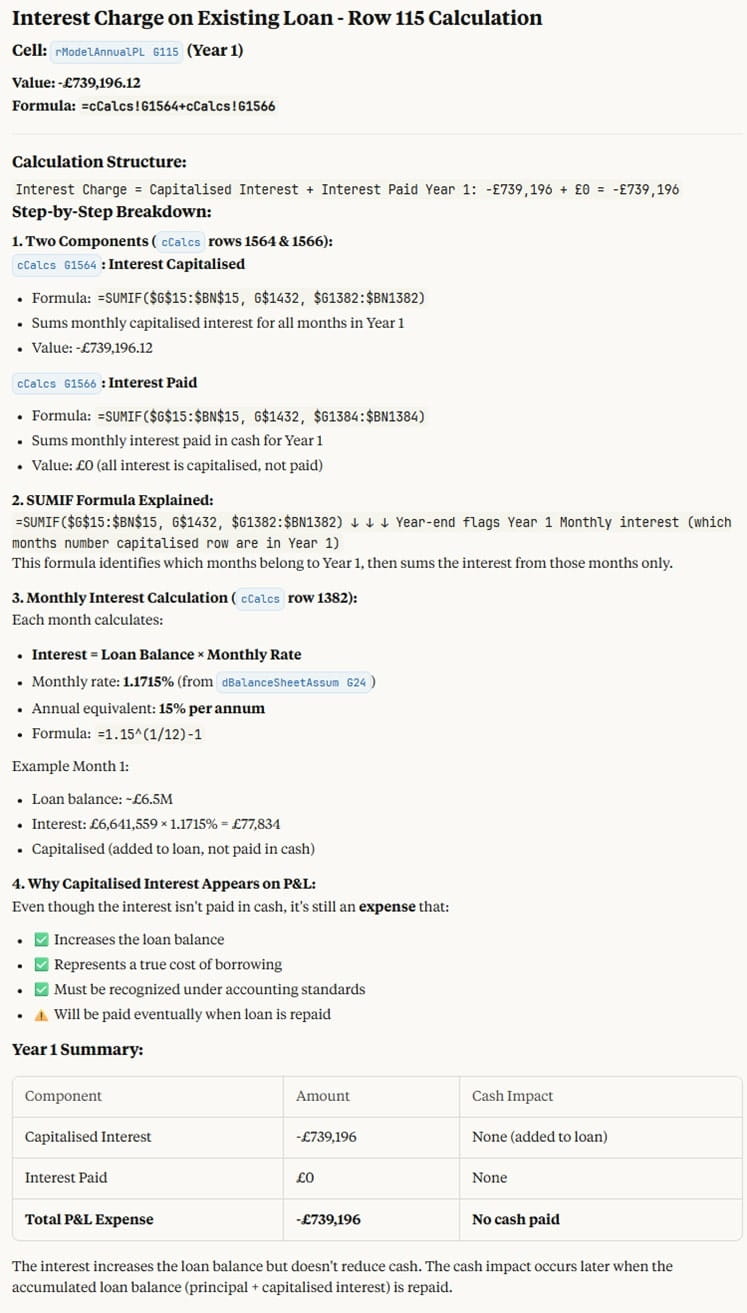
Figure 3 – Model output explanation
That said, hallucinations can still occur, even in documentation. Statements that sound plausible may not be correct. The same professional scepticism applied to formulas must also be applied to narrative text.
Reviewing existing workbooks
Claude is also useful in review mode.
Opening an existing workbook and prompting Claude to analyse it against the ICAEW principles for good spreadsheet practice generates structured, relevant feedback. This does not replace a full technical review, but it can act as a first-pass internal benchmark, highlighting areas for closer inspection.
In one test, Claude was asked to identify hard-coded values. It found only a single example – a simple conversion from annual to monthly interest rate in an input cell. In that context, we agreed the hard-coding was acceptable.
The learning point was not about correctness, but about prompting. If formatting conventions, materiality thresholds or acceptable exceptions are not made explicit, the model will apply its own assumptions.
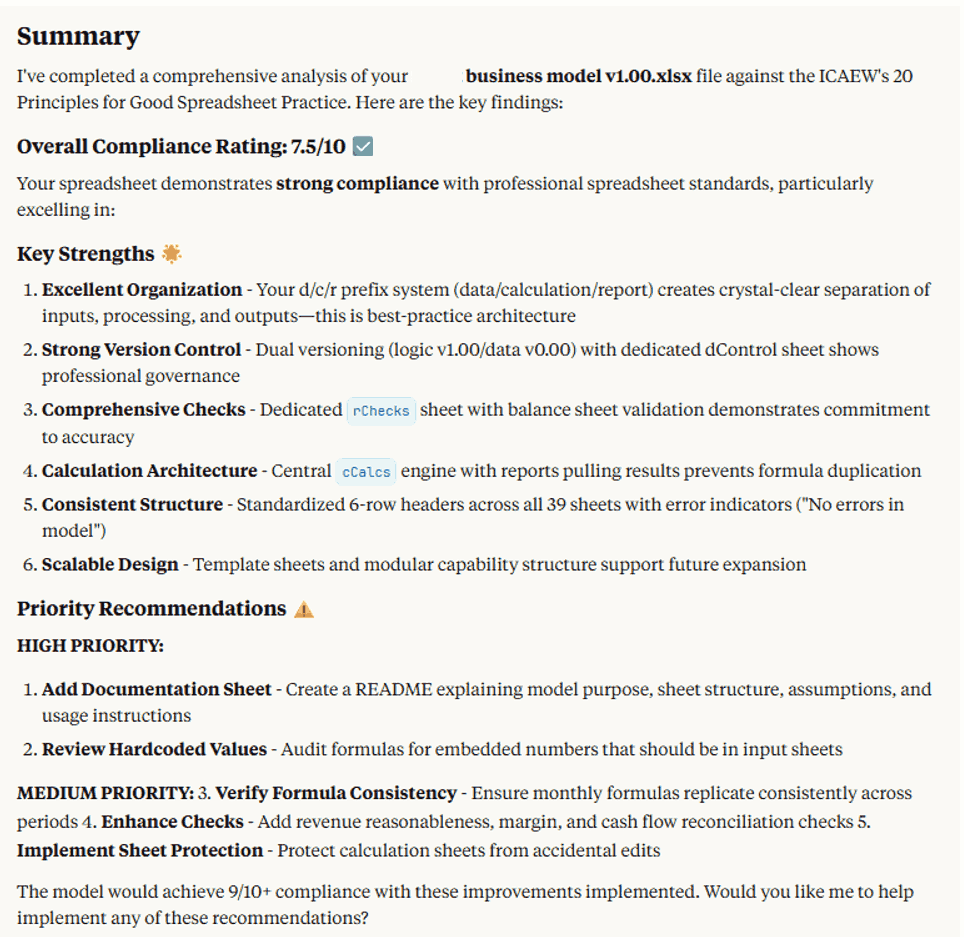
Figure 4 – Example of spreadsheet review feedback generated by Claude
Data analytics
Just as you can load a csv file into a Claude conversation and ask for insights, you can now do the same directly in Excel.
A key difference is that the insights can be built directly into the workbook as charts and formulae. Using the UK government “Wholesale fruit and vegetable prices” data set for 2015 to 2025 it generated the following from the prompt “Generate insights using this data and create a visualisation dashboard”. This is a useful starter and food for thought!
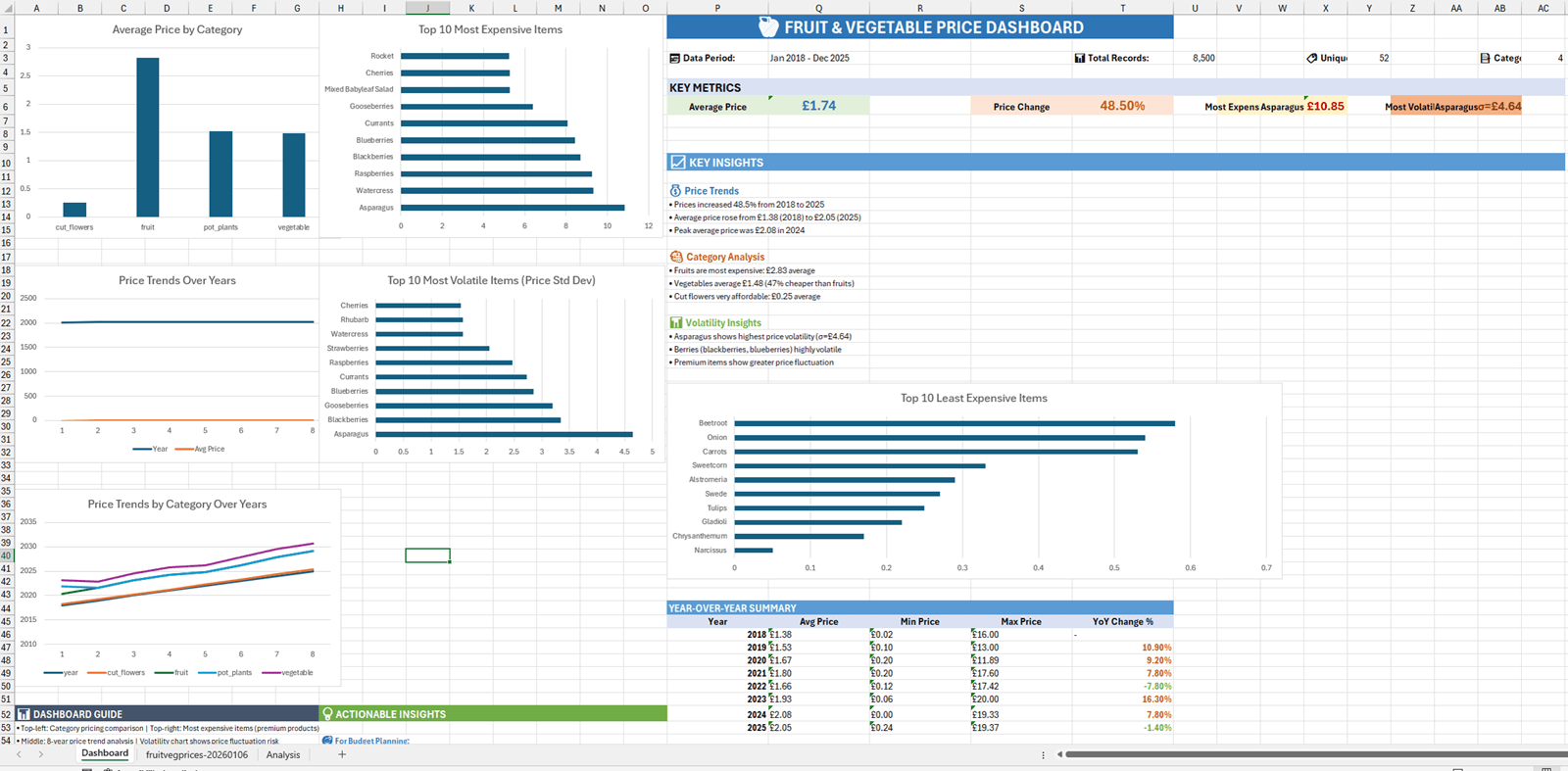
Figure 5 – Fruit and vegetable pricing dashboard.
Where professional judgement still matters
Across all use cases, a consistent theme emerges: Claude is a capable assistant, not an autonomous modeller.
It is very good at:
- Accelerating early-stage thinking.
- Reducing blank-sheet syndrome.
- Generating structure, commentary and options.
It is not yet reliable enough to:
- Guarantee technical correctness in complex models.
- Resolve structural errors without guidance.
- Distinguish confidently between valid assumptions and hallucinations.
- This places responsibility firmly back with the user. As with any LLM, the more clearly expectations, constraints and standards are defined, the more useful the output becomes.
Early conclusions
Claude for Excel is a powerful illustration of how AI is moving from the periphery of analytical work into its core tools. Used with appropriately detailed prompts, it can save time, improve documentation and accelerate exploration.
Used uncritically, it can just as quickly introduce subtle errors or misplaced confidence.
For ICAEW members, the most encouraging finding is that professional frameworks still matter. Spreadsheet principles, clear prompts and structured thinking remain essential – and are arguably more important than ever when working alongside generative AI.
This is an area that will evolve rapidly. For now, the Claude add-in is best approached as a junior but enthusiastic assistant - productive, occasionally mistaken, and always in need of supervision.
Archive and Knowledge Base
This archive of Excel Community content from the ION platform will allow you to read the content of the articles but the functionality on the pages is limited. The ION search box, tags and navigation buttons on the archived pages will not work. Pages will load more slowly than a live website. You may be able to follow links to other articles but if this does not work, please return to the archive search. You can also search our Knowledge Base for access to all articles, new and archived, organised by topic.
