
Welcome back! We’ve got lots to share in this article. From co-hosting one of the biggest Excel events in the world to hitting the road across the UK and visiting Accountex, it's been a packed few months - let's get into it.
The Global Excel Summit Comes to London
Last week, we co-hosted the Global Excel Summit in London. If you haven't come across this before, think of it as the ultimate gathering for people who love spreadsheets. Two full days of sessions, demos, debates, and conversations covering everything from AI and Python to data visualisation, Power BI, and beyond.
It's not just for seasoned pros, either. The Summit brings together teams, independent learners, and curious professionals who want to sharpen their skills and see what's on the horizon for their favourite Microsoft tool. This year we had lots of Excel esports players in the room too and the energy was brilliant.
Our Favourite Moments
There were too many great sessions to list, but here are a few that stood out to us.
Leila Gharani opened things up with a keynote on z-normalisation, dynamic time warping, and clustering, all using Python in Excel. These aren't exactly everyday topics for most Excel users, but Leila has this rare ability to take complex ideas and make them feel completely within reach. We can’t expect everyone to learn Python overnight but if you stick to a schedule of learning a little bit each week, you should pick up the basics pretty quickly.

Carolina Lago kept the Python momentum going later that day, walking through how to run scenarios and Monte Carlo simulations directly in Excel. For anyone working in finance, this was a session full of practical takeaways.
Jakob Nielsen from Microsoft then gave us a look at the rich data types now available in Excel; things like live stock prices, geographic metadata, and exchange rates. He also showed how custom add-ins can extend these even further. If you missed the ICAEW article on rich data types, it's worth revisiting.
Regex
Victor Momoh gave us the perfect introduction to Regex with an impressively un-scripted live demo on a Mac that he’d never used before! If you haven’t yet tackled Regex, the Excel Community explored regex in a webinar which you can watch on demand here.
Another Big Topic: AI
No surprise here. AI featured heavily across the Summit, and the conversations were refreshingly grounded.
Danielle Stein Fairhurst shared her perspective on where AI can add genuine value for financial modellers, and, just as importantly, where it still falls short. It was an honest, balanced take that resonated with a lot of people in the room.
Damien Bird then took things up a notch with a series of live demos showing Power Automate and AI working together in Copilot Studio. We learned that Power Automate is suitable when a deterministic approach is required - for example extracting information from an email that comes in from a specific sender, while a probabilistic approach with AI can be used to support with writing code to perform analysis on a dataset. We also saw different options of prompting Copilot via written natural language or spoken voice recognition.
If you're sitting at your desk wondering where AI fits into your day-to-day work, you're in good company. Based on what we're seeing, there are four practical areas worth exploring right now:
- Cleaning data is a strong starting point. AI tools like Claude, Copilot, and others can speed up messy data prep, though you'll want to think carefully about maintaining an audit trail. Different tools handle this differently, and the right prompting makes a big difference.
- Formulas and visuals are another area where AI is proving genuinely useful. Whether it's creating formulas, auditing existing logic, or generating dashboard layouts, it can save real time. We've seen some impressive results when people use AI to build out visualisations they wouldn't have attempted manually.
- Writing code is where things get exciting for power users. AI can generate VBA, Python and M code fairly reliably, and Office Scripts with a bit more caution. You must be capable of reviewing what it creates though – we’re still not out of that phase quite yet.
- Finally, there's the growing world of agentic features, where AI can help standardise how workbooks are set up, apply consistent methodology, or link your spreadsheet workflows to other applications. This are moving fast in this area.
Unpivot Steals the Show
Towards the end of day two, two of the Unpivot podcast hosts delivered sessions that were definite highlights.
Mark Proctor gave a brilliantly entertaining talk about the strange ways Excel handles values, weaving Taylor Swift songs in throughout, all embedded into custom functions. It was equal parts informative and hilarious.
Most functions convert ranges into arrays, but did you know about the “Magic 11” Excel functions that can take in ranges as inputs and return ranges back as outputs? [INDIRECT, OFFSET, IF, IFS, DROP, INDEX, XLOOKUP, SWITCH, TRIMRANGE, CHOOSE, TAKE].

Wyn Hopkins followed up with a session packed with tips and tricks for building dashboards that stick in people's minds. Our favourite shortcut he shared? Try the shortcut Windows + V when you’re in a Microsoft application if you have ever wanted to see your clipboard history.
Unpivot
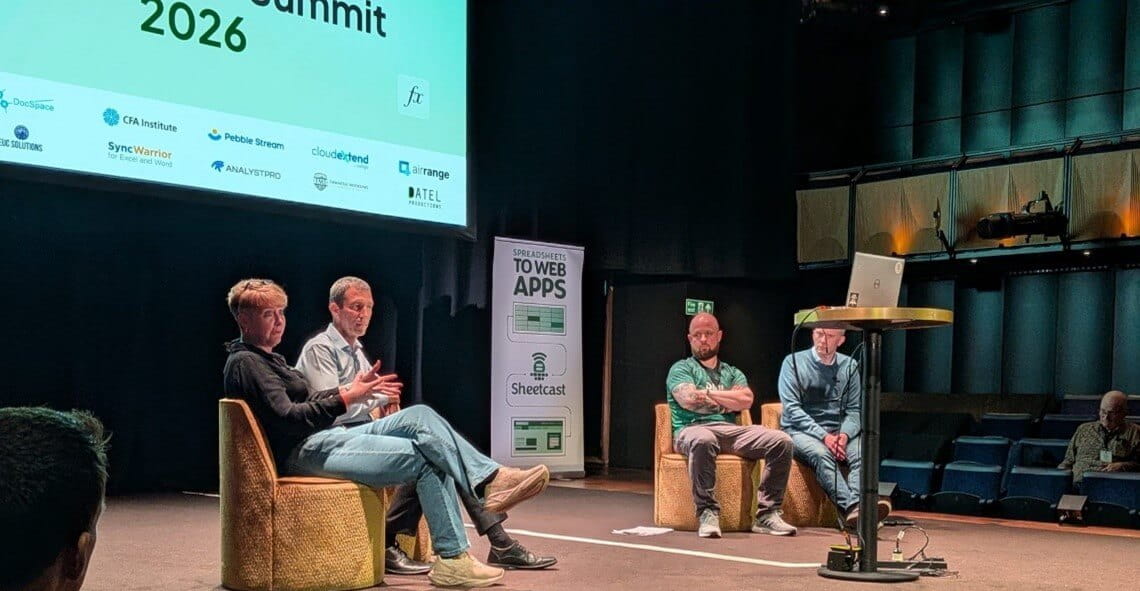
And then Giles and Sue Bayes joined the rest of the Unpivot crew for a live debate to close out day two: Which is better, Power BI or Excel? We won't spoil the verdict here, but the discussion was lively, funny, and surprisingly thought-provoking.
The Community That Makes It All Worth It
One thing that always strikes us about events like the Global Excel Summit is the community. At the end of each day there were dedicated sessions for people to connect, catch up, and swap stories. For us, that's a huge part of why we do this - we get to see friends from across the world, hear what they're building, and share what we've been working on.
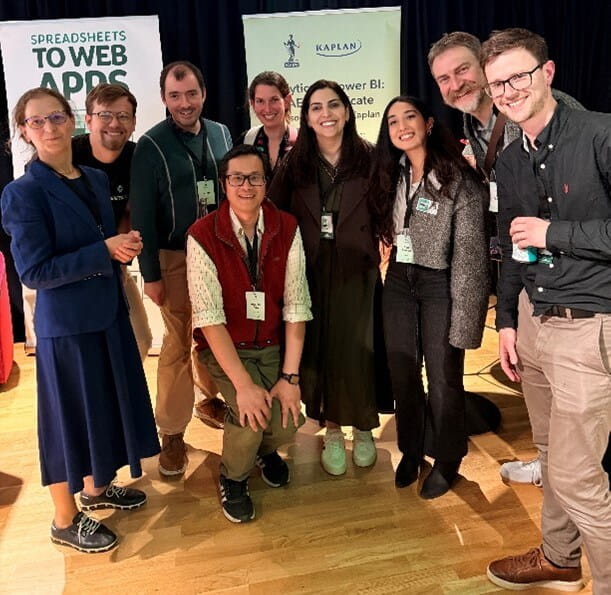
The Excel community is genuinely one of the most generous, curious, and welcoming groups we've been a part of. Whether you're an MVP, a seasoned or novice Excel esports competitor, or someone just getting comfortable with the basics, there's a place for you. We had an impressive turn out of the Excel Community Advisory Board at GES – here’s a photo of a group of us at the networking event:
Reflections on Our UK Tour
We mentioned our upcoming UK tour in our last article and just wanted to circle back to that quickly.
We started in Leeds and Manchester where we spoke to students who, it turns out, barely used Excel, were learning R, and thought we were mad for suggesting spreadsheets would matter after graduation.
We then drove up to Edinburgh (mainly to enjoy the scenery and to trek up Arthur’s Seat), and then over to Liverpool to interview Sean Mooney – a financial modelling pro who we connected with through our Esports activities.

We ended the UK tour back at Accountex in London, where most of the buzz was about AI and MTD. We did find one session about Excel and Power Query, delivered by the ever-insightful Mark Proctor to a packed crowd! If you haven’t yet tried Power Query, we really recommend giving it a go.
What's Next
We've wrapped up the UK tour, attended some major Excel events, and now we’re ready for the next adventure (we’re just not sure what that is yet). If you want to stay in the loop on future Excel on the Road events, or if you're curious about anything we've covered here, get in touch with us. We'd love to hear from you!
Archive and Knowledge Base
This archive of Excel Community content from the ION platform will allow you to read the content of the articles but the functionality on the pages is limited. The ION search box, tags and navigation buttons on the archived pages will not work. Pages will load more slowly than a live website. You may be able to follow links to other articles but if this does not work, please return to the archive search. You can also search our Knowledge Base for access to all articles, new and archived, organised by topic.
