
Our digest of new features across Microsoft 365 and other business tech products in written, images and video format covering the last three months.
Our digest of new features across Microsoft 365 & other business tech products in written, images & video format covering the last three months, see the previous update here.
My top 5
- GROUPBY & PIVOTBY (formula Pivot Table alternatives) can be accessed by any M365 user
- Create and edit entire data models in Power BI online
- User defined functions in Power BI’s DAX
- Run a Teams meeting in multiple languages & Copilot translates for all
- Google Sheets’ version history condensed view makes it easier to track who edited what
Excel, Word, OneNote & PowerPoint
- More variety in pen styles when drawing: The Draw tab (which may be hidden by default) allows the fountain pen now as well as other styles. If you do not see the Draw tab, go to File > Options > Customise Ribbon > Tick Draw tab
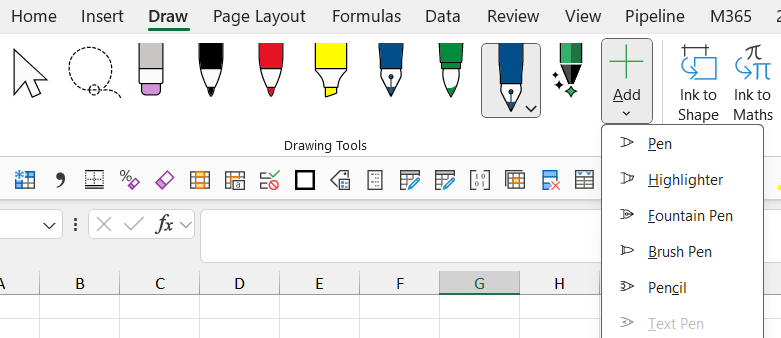
- Reorder pens using drag & drop on the Draw tab
Excel
Excel publishes a digest every month which the author contributes to, here are articles for June, July, August and September 2025 and the image shows which features are in which channel (see below for how to check your channel).

New in Excel Desktop Current & Monthly Enterprise Channels
- View files/worksheets side by side on Mac: This feature in View tab has been on Windows for a while and now is on Mac.
New for Excel Semi-Annual channel
- =GROUPBY and =PIVOTBY functions are a Pivot table inside a formula: They refresh automatically and allow new types of aggregations like median and combining text. More in this article I previously published and the video below:
- =PERCENTOF(value, range) provides a new way to calculate % of total, released alongside GROUPBY
- Python in Excel: Excel’s formula tab now has a section for Python whereby you can add code natively in the formula bar unlocking new capabilities for data visualization, data cleansing, web scraping and more. The video below shows how to unlock new charts
- New partial calculation mode: The far right of Excel’s formula tab a calculation mode toggle, back when computers were less powerful, it made sense to work in “Manual calculation mode”, rather than the default “Automatic”, the new “Partial” option will calculate Excel formulas but not Python code nor data tables.
- Manual calculation mode’s stale values show with strikethrough: When you are in manual or partial calculation mode, values which are not calculated based on data changes have a line through the values.
- Toggle formula compatibility: Some functions have a newer version which is only accessible to M365 users, but go to calculation mode > Compatibility mode to use the functions as they once were. For now, the only difference is for text functions recognising unusual characters.
- Reduce bloated files with Check performance: This feature on Excel’s Review tab scans your file for unnecessary formatting which is often the culprit for unintentionally large file sizes. More in the video.
- Toggle on/off Data type icons from the View Tab.
- 3 new REGEX functions: Perform complex text transformations using the REGEX coding language natively in Excel. REGEXEXTRACT could “extract the email from the cell regardless of where it appears”. REGEXREPLACE could “replace any number in the cell with the letter X or REGEXTEST could return true for all cells with a \ character. More in this video.
- Add checkboxes in cells: Insert > Checkbox will add them, ticked boxes return TRUE
- Filter comments: View only unresolved or tasks assigned to you
- Link to range: Right click a range of cells or worksheet and get an option to generate a link to the range selected to share
- =TRIMRANGE: If you find yourself regularly entering =IF(x=””,””,calculation) as a failsafe where you can extend beyond the row without the ugly zeros, then =TRIMRANGE can help, you can set it around a range and it will automatically expand when new data is entered. The video below explains it more
- An =TRIMRANGE using. For example =TRIMRANGE(A3:A12) is equivalent to =A3.:.A12.
New in Excel Current Channel for Copilot subscribers (paying an additional $20-30 per month)
- Formula completion suggestions: Type = next to a column and copilot will suggest formula ideas such as extracting the name of the month from an adjacent date column or capitalising
- =COPILOT can be used on the grid and a new smarter “Agent mode” on a side bar on Excel are new, but for Beta users only so not covered in this article.
Word Semi-annual channel
- Ctrl Shift V to paste with “keep text only”
Microsoft 365 Core Office Apps channels and Copilot versions explained
Excel, PowerPoint, OneNote, Outlook and Word release regular updates to Microsoft 365. To see or update your version, click File> Account. The Current Channel should now be on version 2509, which is the year 2025 and month 9 (September) with 2510 (October) coming later this month, the Monthly Enterprise channel releases updates a couple of months after the Current Channel. The Semi-Annual Channel released an update in July 2025 up to version 2502. The Insider or Beta features are only available for a small selection of people who sign up to help test features, so they haven’t been reported explicitly, but they give a good idea of what is coming next.
Microsoft 365 has three licenses for Copilot:
- Copilot Free is accessible via a web browser but not inside the apps.
- Copilot Pro ($20/month) is for M365 home users, and is in apps for Excel, PowerPoint and Word.
- Copilot for Microsoft 365 ($30/month) is the same as above but also within Outlook and OneNote and integrates with SharePoint and other Office Apps from Forms to Loop and more.
Microsoft Teams
*These features are only available to AI enabled Teams, ie, Teams Premium or Microsoft 365 with Copilot.
- Send messages to lobby attendees with Lobby Chat
- Town Hall improvements: This advanced meeting type can now have up to 100k concurrent attendees plus they allow raising hands and polls, plus people can dial in
- Set your own keyboard shortcuts: Click Settings & More … > Keyboard shortcuts
- Multiple emoji reactions per message
- Follow threads in channels so you get notified about them, From a channel message click More options > Follow Thread, More here.
- Add a countdown timer whilst in Teams meetings: Click More > Timer, works in scheduled meetings but not “Meet now”

- Allow other presenters to control moving slides back & forth
- Save messages and go back to them later on for quick access
- Enable RTT (Real time text) during meetings. Someone can type in and it is typed in real time character by character live and included in the captions. To turn on, go to More Actions > Language & speech > Enable RTT
- Send messages to attendance in the lobby
- Search for meetings by meeting name or participant name
- Multi language spell check: Select up to 3 active languages via: Settings > General > Editor spell check > Manage
- *Prevent Screen Capture: Teams Premium can turn this on so users cannot take screenshots during a meeting.
- *Talk and listen in your native language in a meeting: Up to 20 hours per month are included with a Copilot license. To turn on access More Actions > Language & speech > Interpreter > Turn on for me. More here.
- *Add "Facilitator" to your meetings to remind everyone about agenda items, transcribe notes etc. More here
- New "Controls" menu in meetings for organisers to get to quick controls
Other Microsoft 365 apps * are for paid Copilot license holders
- Forms with Copilot has an enhanced AI agent. More here
- Bulk edit Planner tasks in grid view by multi selecting tasks and editing
- Right click a file in File Explorer and ask Copilot a question about your file
Power BI
Power BI releases monthly update blogs, here they are for June, July, August and September. The features below marked with a ^ must be turned on as preview options via File > Options and settings > Options > Preview settings and items with a * are for Copilot users only.
- ^ Nonstandard calendars allow non-December year ends, week to date calculations and more (such as 454 calendars used in retail which has months lasting 4 weeks, 5 weeks and 4 weeks and repeated). Click 3 dots on your date table > Calendar options and set it up, more here.
- Create & edit Power BI on the web: The full editor is now available there including Power Query, creating relationships, DAX modelling, creating visuals and even the performance analyser.
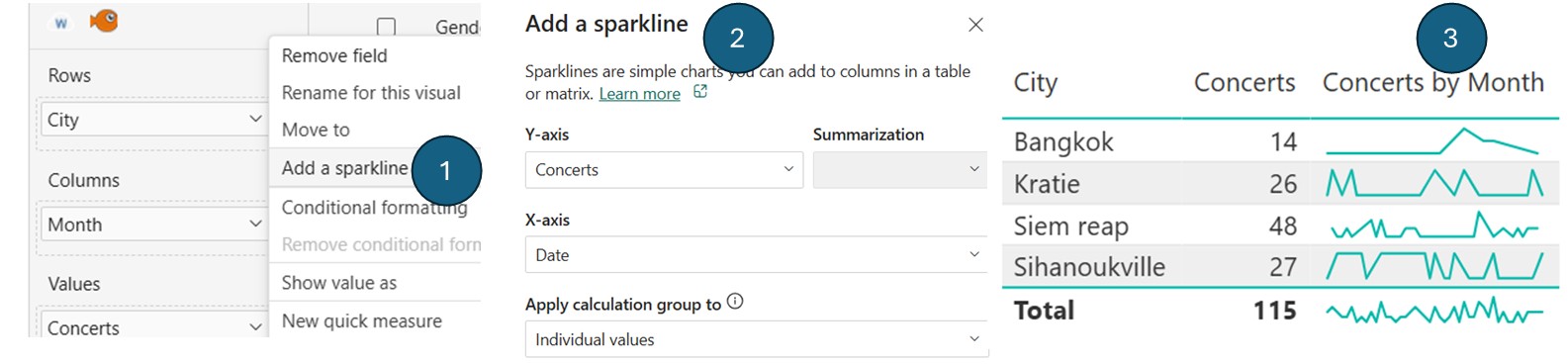
- In cell line charts "sparklines" are now generally available: After around 5 years in preview, they launched with a new option for how they deal with Calculation Groups. Create a table/matrix with a measure, right click > Add a sparkline, usually, choose x axis from a date table (day/month/year etc.).
- New (TMDL) view modern code-first editing experience: Edit Power BI semantic models using the Tabular Model Definition Language by clicking on the fifth icon on the left-hand navigator. More here
- ^Specify Visual level calculations sort order, add ORDERBY so eg, Costs percent = RUNNINGSUM ( [Percent of grand total], ORDERBY ( [Costs], DESC ) )
- Organisational themes: Admins can navigate to the Admin portal on Power BI online to set these themes by uploading JSON files.
- Add pie & donut slice borders: You can also adjust transparency and border thickness.
- Field parameters are now generally available: Toggle dimensions or measures via a slicer by going to Modelling > New Parameter > Field
- Refresh Data and Schema individually: Click the dropdown on Refresh and choose Schema to refresh only new columns, column types etc, and data for the data without amending the structure.
- *Using Copilot to write measure descriptions is generally available now
- ^DAX user defined functions: Write a custom function in DAX (like Excel's LAMBDA) using the codeword FUNCTION, but you must use DAX Query View or TMDL view. More here
Google Workspace (general users)
- Sheets version history condensed view: File > Version history will now only show the rows which changed, click "Show unmodified rows" to see the same view as before.
- =ISURL() and =ISEMAIL() now more accurately return TRUE when they are properly formatted in Sheets
- A new full screen option appears when sharing a screen or viewing shared content in Meet
- Present content from camera in Meet if you use external cameras
- Gmail now allows you to manage subscriptions & unsubscribe all from one place.
- Migrate data from Microsoft SharePoint Online to Google Drive using a new Data Migration service
- Decide who can respond to Forms on existing forms
Google Workspace (Gemini users only)
- Conversational formula generation with Gemini Explain formulas, identify formula errors, suggest formulas and more.
- Convert slides into videos: Use Gemini in Google Vids for this.
- AI analytics on Text answers to Google Forms questions.
- Refine Google Slides text boxes with AI. Click below the text box and then shorten, rephrase etc.
- Autodetect and name tables in Sheets
- Listen to your documents in Docs
- Google Forms Gemini can auto create a form, suggest new questions, summarise forms responses (especially useful for text summarisations),
- Create illustrated storybook from a prompt using the Gemini sidebar
- =AI() in Sheets can now generate text row by row, categorise data and summarise information
- Generate charts in Sheets based on existing data and a prompt
Zoom meeting enhancements
- Zoom Hub is a new centrally managed file management to access Zoom assets (recordings, docs, meeting summaries, whiteboards etc.)
- Hosts can manage each participant's spoken language and translation settings
- You can now rename voice recordings from the meeting and calendar cards on mobile/desktop apps
- Live stream to Workplace from Meta is no longer available
- New hand gestures: These include 2 thumbs up, thumbs down etc.
Chat GPT
- Create a personality: Choose Settings > Personalisation, and options are Cynic, Robot, Listener, Nerd
- Advanced voice mode now unlimited for Plus users, and hours per day for free users.
- Chat GPT’s Projects are now on the free tier too, this logs individual memories, return style and expertise in certain areas.
- Parental control: Set up how your child might be able to interact with the product.
- Study mode is built to enhance learning of certain topics, access it here or go to "Study and learn" from a new chat.
- Turn on record mode: transcribe and summarize audio recordings like meetings, brainstorms, or voice notes. Click the record circle button on the bottom right.
- Improved memory for free users from past conversations.
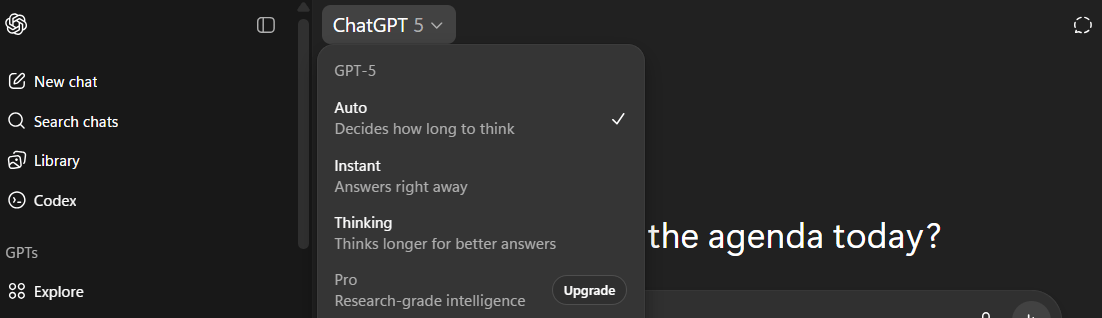
- Toggle response speed: Click the top left icon to choose whether to use Chat GPT-5 Auto, Instant or Thinking as a paid user.
Canva
- Search colours by name in the colour search bar and get many types of each
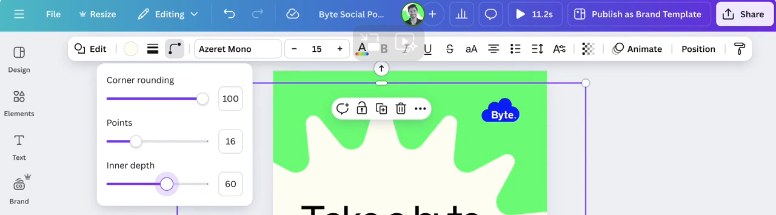
- More shape customisations like number of points and inner depth
- Create AI images inspired by a style: From Magic Media, upload an image and the generated image will match the style.
- Create an AI video from a prompt using Google's Veo 3: This is the default mode now.
- Swap arrow direction in one click for a shape.
- Add chart titles: Previously you couldn’t.
- LinkedIn Ads app: Use this to fast-track LinkedIn marketing.
- Download Canva code: View and copy the actual code you generated from a prompt.
- Bulk Create updates: Launched earlier this year you can map a spreadsheet to a design to generate multiple versions of the same design, now it supports up to 150 fields including the page name.
- Canva AI assistant is now in 17 languages: Arabic, Chinese, Dutch, English, French, German, Hindi, Indonesian, Italian, Japanese, Korean, Polish, Portuguese, Spanish, Thai, Turkish, and Vietnamese.
That wraps up the updates until September 2025, come back for more new features in December.
- New tech features for Mar-May 2026: Excel, Teams, Google Sheets, Chat GPT, M365, Power BI, Canva, Claude, Zoom ++
- New tech features for Dec-Feb 2026: Excel, Teams, Google Sheets, Chat GPT, M365, Power BI, Canva, Zoom ++
- New tech features for Sep-Nov 2025: Excel, Teams, Google Sheets, Chat GPT, M365, Power BI, Canva, Zoom ++
- Excel, Teams, Google Sheets, Chat GPT, M365, Power BI, Canva, Zoom ++: New tech features for June-Sept 2025
- Excel, Teams, Google Sheets, Chat GPT, M365, Power BI, Canva, Zoom ++: New tech features for Mar-May 2025
Archive and Knowledge Base
This archive of Excel Community content from the ION platform will allow you to read the content of the articles but the functionality on the pages is limited. The ION search box, tags and navigation buttons on the archived pages will not work. Pages will load more slowly than a live website. You may be able to follow links to other articles but if this does not work, please return to the archive search. You can also search our Knowledge Base for access to all articles, new and archived, organised by topic.
