
See the previous update here. Starred items * throughout are only available with premium AI subscriptions.
My top 5
- Use Smart Fill in Google Sheets for en masse research or formula from a prompt
- PowerPoint Online’s new AI “Edit picture” option can upscale, remove background or more
- Excel’s Copilot now has Plan mode which prompts the user before analysing
- Claude Cowork can make changes inside the files and folders on your computer
- Zoom has launched an Office-like productivity suite including Sheets, Slides & Paper
Excel
Microsoft publishes a digest every month which the author contributes to. Here are articles for March, April and May 2026, and the image shows which features are in which channel (see below for how to check your channel).

New in Excel Desktop for all M365 channels (even those not paying for Copilot licenses)
- *[OR1.1]Work IQ context with Copilot in Excel: Copilot has immediate access to recent emails, meetings, chats and documents so you can refer to them directly within Excel’s Copilot. E.g. “Make a table with all the people who have not yet replied to my group email requesting availability for the annual review”.
- Edit with Copilot: “Agent mode in Copilot” has been renamed to a dropdown list to “Allow editing”. This enormous update which can clean messy data, fix broken formulas, create a financial model or a dashboard was summarised in last quarter’s blog. It’s available at no extra cost for users in an organisation with under 2000 people or via a Copilot license for larger organisations. More on this in this video:
- Plan mode for Copilot: Edit with Copilot can make direct changes in your file, but selecting Plan mode will show you the plan of how to edit your workbook before executing it, so you can make changes or recommendations via chat.
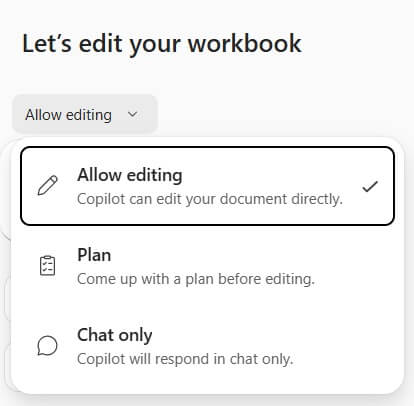
- Copilot has moved to the bottom right of the screen as a floating button, right click to dock it.
- Office Scripts had a user interface redesign.
Excel Online
- “Show Changes” (on the Review tab) now breaks down where changes were made by users or Copilot. The desktop version of Show Changes marks them as the user who prompted Copilot.
Word and PowerPoint Desktop
- Copilot moved to the bottom right of the screen, right click to dock it (the same as Excel).
- PowerPoint and Word now have “Edit with Copilot” capabilities as well. You can do things like:
- Make this slide into a diagram
- Check titles are consistent fonts across my document
- Generate an image in the slide of a finance department
- Change the context to be aimed at senior management
Note that PowerPoint’s “Edit with Copilot” is extremely slow at the time of writing.
PowerPoint Online
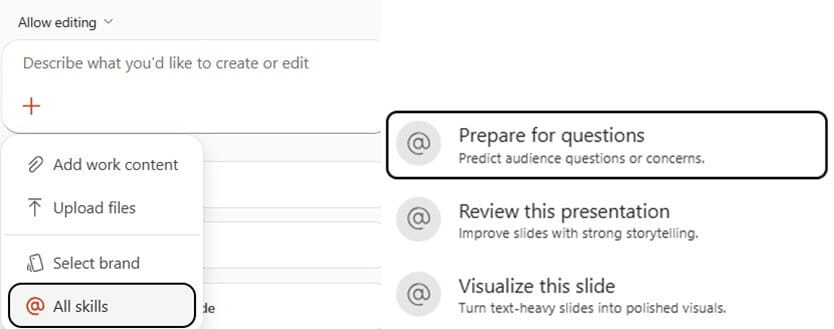
- Skills inside Copilot:
- Prepare for questions: Warn you about gaps where people might find questions
- Review the presentation: Give you ways to visualise it stronger
- Visualise this slide: Clean slides with excessive text
- Edit Picture: This AI-enabled tool gives you AI-based methods for editing images, including:
- Proper background removal (not the primitive job the desktop app can do)
- Image upscaling
- Eraser: E.g. erase a flying bird and AI will fill it with the sky similar to the area around
- Image Effects such as those shown in the screenshot below:
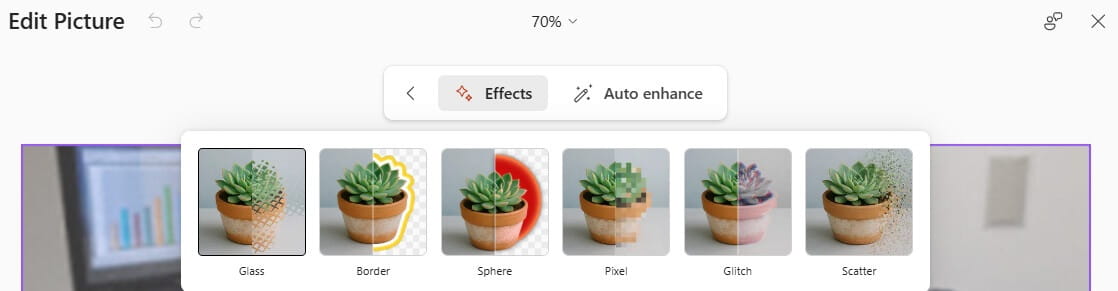
Note: At the time of testing this, it works very slowly and often says it cannot do the action requested.
Microsoft 365 Core Office Apps channels and Copilot versions explained
Excel, PowerPoint, OneNote, Outlook and Word release regular updates to Microsoft 365. To see or update your version, click File > Account. The Current Channel should now be on version 2605, which is the year 2026 and month 5 (May). 2606 (June) should be released later this month, the Monthly Enterprise channel releases updates a couple of months after the Current Channel. The Semi-Annual Channel released its last update in January 2026 up to version 2512 and released no update in this quarter. The Insider or Beta features are only available for a small selection of people who sign up to help test features, so they haven’t been reported explicitly, but they give a good idea of what is coming next. Frontier is a new tier that gets Copilot/AI features ahead of others.
Microsoft 365 has different license tiers for Copilot:
- Users have Copilot basic if they don’t pay for an additional license, although if they are in a small organisation (with under 2000 employees) they get access certain but not all Copilot functions, including Edit with Copilot. Items with a * above cannot be accessed.
- Copilot for Microsoft 365 (£25/user/month) has additional functionality, including Clean Data and Formulas by Example in Excel. There may be offers for cheaper licenses online.
Microsoft Teams:
*These features are only available to AI-enabled Teams, i.e. Teams Premium or Microsoft 365 with Copilot.
- Teams meeting notes are now available for “Meet now” instant meetings.
- Adjust the space taken by the meeting participants vs shared content by dragging the line separating the two.
- *Multilingual meetings are translated live, so a Bulgarian and a Swede can now have a Teams meeting speaking their native language with Teams doing the translations.
*Microsoft Copilot enhancements
- *Click to disable Work IQ: There is a new interface in Copilot’s browser experience where users can switch between Work IQ (where Copilot searches your documents, emails etc.) and Web (Where Copilot looks up what is available online).

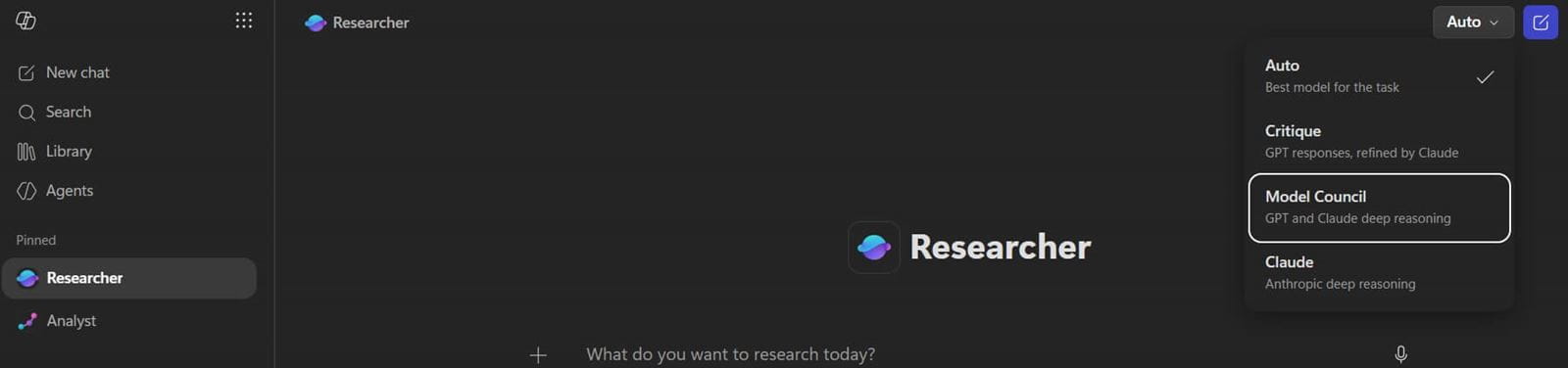
- *Copilot’s Researcher Agent now has options which make use of both GPT and Claude:
- In Critique mode, GPT does the research and Claude reviews it.
- In Moden Council mode, you get two reports, one from each, and an overview of where they differ.
- *Copilot notebooks updates: This new research app has a pre-selected set of documents in its “bank”, so you can build AI-powered notes from them. You now get an overview page automatically created in every new notebook. The overview page has capabilities to create:
- An audio overview allowing you to listen as is if it were a podcast, either a monologue or dialogue.
- A mind map with branching nodes
- Create a study guide from a notebook including games such as “Fill in the blanks”, “Flash cards” etc.
Power BI
Power BI releases monthly update blogs, here they are for March, April and May. The features below marked with a ^ must be turned on as preview options via File > Options and Settings > Options > Preview Settings, and items marked with a * are for Copilot Users only (which is a different Copilot license to M365’s Copilot).
- Set any page as landing page: right click a page & select so it’s the default when the report is opened.
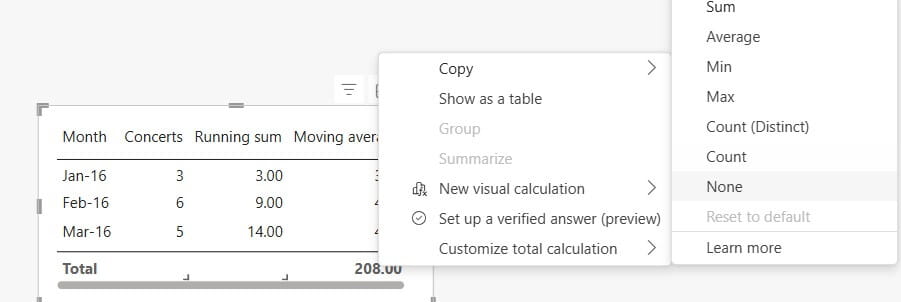
- Right click totals in Table & Matrices to choose “Custom Totals” & choose from Sum, Count, Average etc. or even “None” for a certain cell.
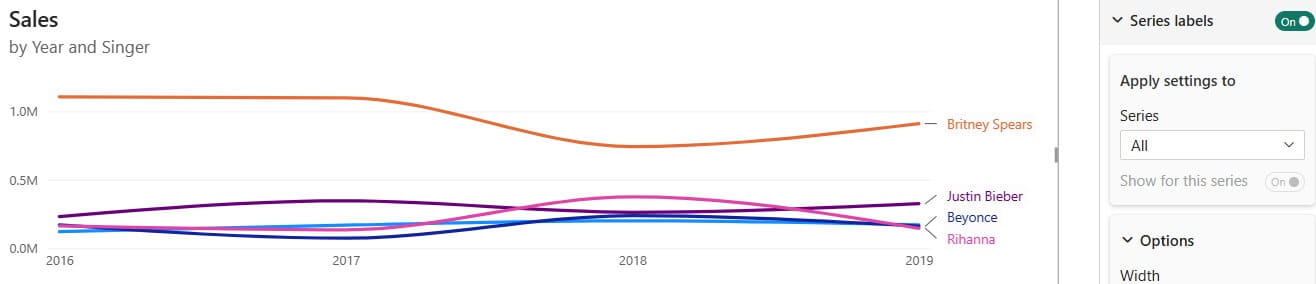
- Series labels have leader lines to help with distinguishing lines close together.
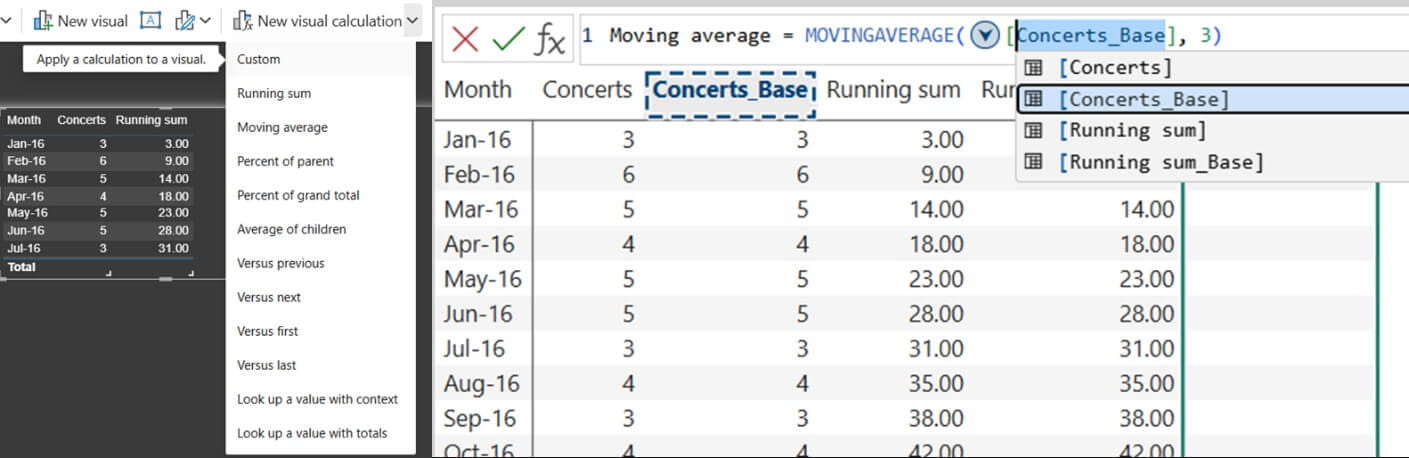
- Visual calculations are now generally available: Click “New visual calculations” on the menu and choose things like percent of parent total, running total etc.
- Input slicer now allows choosing numerical ranges such as >6 or 4-9 and allows conditional formatting.
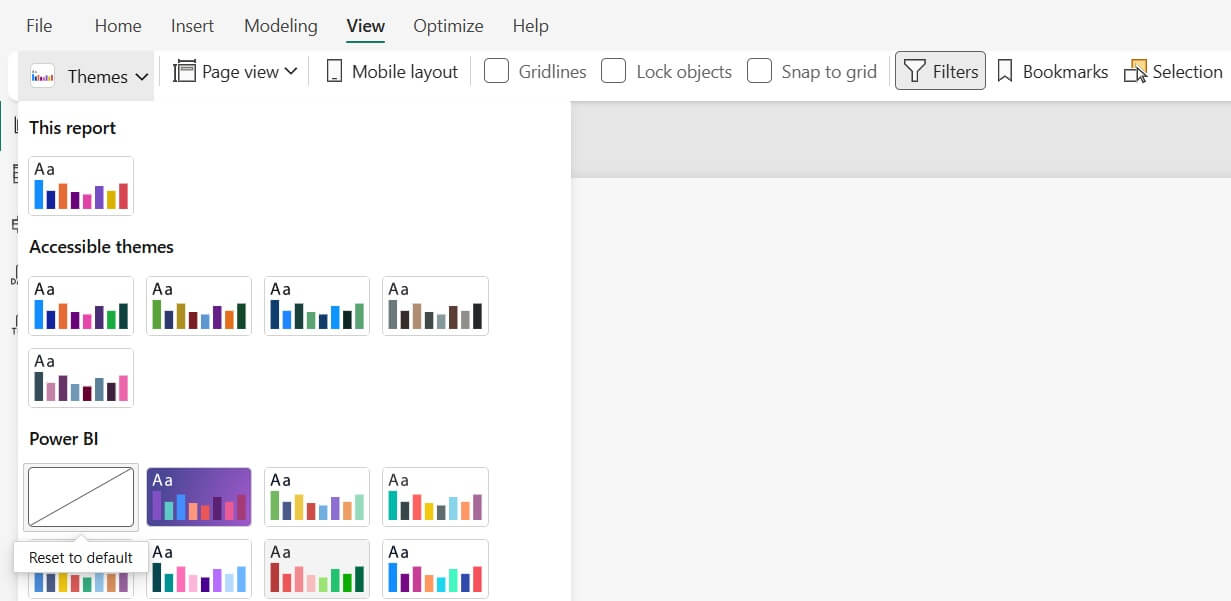
- Theme dropdown how has “reset to default” in the View tab.
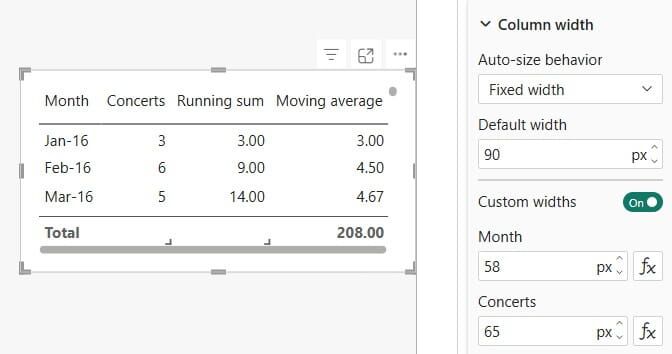
- Specify the width for all Table columns or column by column in pixels.
- Set exact pixel dimensions for card, button slicer, and list slicer items.
- Version history in Power BI Desktop for SharePoint/OneDrive files by clicking the filename.
- ^Updated Get Data experience for Power Query: This preview feature changes the user interface for finding data sources, Excel made a similar change in recent months.
- Shape map is generally available: Upload your own TopoJSON or GeoJSON file for data bound visualisation (after around 8 years in preview).
- ^Date picker slicer: A new option in the “style” menu for slicers.
- Chart tooltips can now contain full sentences such as “Sales for March at [Value] changed by [Value] % from the prior month”.
- DAX User defined functions are now generally available allowing you to write & reuse custom functions across your data model. Read more.
Google Workspace (1 Mar-5 Apr) *items are for AI packages only, read more
- *Fill with Gemini: If you drag down a cell on the left instead of the right, you often get a “Fill with Gemini” option which can look up data online en masse or make a formula for you based on the column header, previous row or adjacent data. It applies Google’s =AI function.
- Sheets computations have been sped up: read more.
- Doubled size of Sheets to 20m cells, sign up for early adoption here.
- *AI can convert non tabular data into a table when pasted in Sheets. Bulleted lists, freeform text, or JSON, for example. Click “Convert to Table” after pasting.
- *Build financial models, dashboards and spreadsheets using Google Gemini in a similar way to Excel’s Edit with Copilot. This study claims that Gemini beat out Copilot, Claude and Chat GPT.
- *Canvas view in Google Sheets is a two way dashboard: Set up Kanban boards, cards in a gallery view, calendar view or dashboards from data in a worksheet, and then you can edit either on the worksheet or directly on the visual in the Canvas.
- Search by city for timezone in Google Calendar: Something I’ve wanted in Outlook for decades.
- *Analyse text answers in Google Forms as Gemini groups together themes.
- *Generate cartoon avatars to talk through videos in Google Vids.
- *Gmail offers “Help me schedule” when you are asking about a meeting in an email, it will sync Google calendars against all people in the email thread.
- *Generate AI music on Google Vids from a prompt from the right hand navigator.
- *Google Meet’s chat experience is now richer, matching the Google Chat experience.
- Export Google Vids to YouTube: Click File > Export to YouTube.
- View Google Meet shared content in a separate window by clicking the expand button.
- *Create a slide from a prompt using Gemini in Google Slides.
- *Updates to Google Meet’s AI note-taking, including sections for Summary, Next steps. A new “decisions” section captures outcomes and tracks their status by Aligned, Disagreed, Shelved etc.
- *Invite guest users to your Workspace for secure file editing and chat.
- *Turn prompts into files such as Docs, Sheets, pdf etc.
- *Improvements to Google Docs: A bottom bar allows you to prompt, match your style etc.
- *Ask Gemini in Google Drive: A sidebar allowing queries.
- *Add custom Gemini personalisation preferences for Docs or Sheets: Click the 3 lines on the top left of the Gemini sidebar > Settings > Personalisation.
- *Admins can turn on these settings, which requires meeting participants to provide explicit consent for taking AI notes.
- * Match doc format: Mirror another document’s style & layout with your text via Gemini.
- *Gmail’s Help Me Write improvements: Get Gemini to write emails for you in a more accurate way that reflects your own style.
- Import users from Microsoft to Google Workspace: read more.
- Import a header image into Forms from Google Drive or the web.
- Download and encrypt Slides files with passwords into PowerPoint using the option in the File menu.
- Updated app icons: Google has refreshed its app icons.

Zoom enhancements
- Create avatars in meetings that move like the user and has their expressions: Create via Settings > Video & effects > Avatars.
- Display up to 49 people in Dynamic view (which previously was only 9).
- Hosts can disable copying or downloading files uploaded during a meeting.
- Hosts can allow all participants inside the organization to bypass the lobby (but not external ones).
- Zoom launched a whole new productivity suite on 1 June including:
- Zoom Sheets is taking on Excel. The AI functions are a standout compared to what Excel currently has on offer, including:
- AI: General-purpose AI functions.
- AI.CLASSIFY: Which classifies text from a cell range.
- AI.EXTRACT: Which extracts specific information from the text.
- AI.FORMAT: Which formats data using natural language
- AI.REWRITE: Rewrites text in a specified style using AI Companion.
- AI.SENTIMENT: Analyze sentiment for the text in a cell range using AI Companion.
- AI.SUMMARIZE: Summarize text from a cell range using AI Companion.
b. Zoom Paper which is a Word equivalent.
c. Zoom Slides which is a PowerPoint equivalent, a standout feature is stock images from Pexels and icons from other stock image sites.
Chat GPT
- Access previously uploaded files in the “Library” tab on the left for Free and Go users.
- Check which memory Chat GPT is using in a response: Responses have “Sources” at the end.
- *ChatGPT for Excel and Google Sheets is now available as an add on – read more.
- Chat GPT’s Free and Go plans now have ads in UK, Australia and a few other countries.
- Upload a photo of something you want to buy and ask the chat to “Find similar”.
- *Chat GPT Codex Windows desktop app is now available. As this feature is aimed at developers I have not included many Codex updates in this article.
Claude
- *Claude Cowork can make changes inside your files: Windows/Mac’s desktop app have a tab for co-work which can inspect and analyse entire folders, subfolders. Prompt ideas include:
- Create a contract for this client based on similar terms used in the 50 contracts in this folder./li>
- Create an Excel file with the invoices in a specified folder.
- Create a Q2 report based on all the documents in the specified folder. /li>
- *Claude Design is able to create slide decks and other designs.
- *Claude add ins for Excel and PowerPoint can use AI in those apps.
- Claude can create diagrams, interactive charts and visuals if asked to.
- Memory from chat history is now available to free users.
Canva
- Print shop: Get a product delivered to your door, such as flyers, shirts, bags, greeting cards.
- Split a photo into layers: Click a photo > Edit > Tools > Magic Layers & AI will allow piecemeal editing.
- Upscale image: Click a photo > Edit > Tools > Upscale to improve the resolution.
- AI video effects: Bring a photo to life with these new tools under “Templates”. Hover over to preview them.

- Duotone moved inside filters: This tool to recolour images has now moved under the “Filters” menu (I lost it for a few weeks, so figured you might find that useful).
- Decorate a background: Click on a background > Edit > Decorate & type in what you’re looking for and Canva can design and make the items standalone clickable objects.

Canva revealed many new features including its Canva AI 2.0 upgrade at Canva Create in May, but those features are not generally available yet so are not covered here.
That wraps up the updates until May 2026, come back for more new features in September.
Archive and Knowledge Base
This archive of Excel Community content from the ION platform will allow you to read the content of the articles but the functionality on the pages is limited. The ION search box, tags and navigation buttons on the archived pages will not work. Pages will load more slowly than a live website. You may be able to follow links to other articles but if this does not work, please return to the archive search. You can also search our Knowledge Base for access to all articles, new and archived, organised by topic.
